Accessibility survey questions that find barriers in places, events and websites
Ask the people who use your building, event or website what gets in their way. The core 12 works in any setting; add a set for the building, the website, an event or a booking form, and the six Washington Group questions when you need a disability figure you can compare.
- 40questions
- 12in the core, any setting
- 5 minto answer the core
- 4settings to add
By Michael Hodge, BSc Psychology Updated September 2026
All 40 accessibility survey questions
Each row shows the choices a visitor gets and what their pick means for you. Twelve questions are ticked already; tick the venue, website, event or booking set as well, then build, print or copy your selection.
The core 12: any place or service12 questions
Two questions that sort the answers, seven statements that fit a building, an event, a website or a phone line, and three that name what to fix and what to keep. Send them after any visit.
-
How did you use our service this time?
In personWebsite or appAt an eventPhone or messageSorts every other answer by setting, so a problem with the website is not read as a problem with the building.
-
Do you have a disability, long-term condition or other access need?
YesNoPrefer not to sayThe split that matters most: read the core once for people who say yes and once for everyone. It records a need people name for themselves, not a disability count.
-
I could get where I needed to go.
Strongly disagree12345Strongly agree1 = Strongly disagree, 5 = Strongly agreeReaching the right place: the entrance, the room, the page. When it scores low, it is the first thing to fix, in a building or online.
-
I could do everything I came to do.
Strongly disagree12345Strongly agree1 = Strongly disagree, 5 = Strongly agreeThe plainest test of access: did the visit do its job? A low score here beside good scores elsewhere points to one blocked step.
-
Information was in a form I could use.
Strongly disagree12345Strongly agree1 = Strongly disagree, 5 = Strongly agreeCovers print size, captions, plain words and image descriptions: the fixes for vision, hearing and thinking difficulties.
-
I could get help in a way that worked for me.
Strongly disagree12345Strongly agree1 = Strongly disagree, 5 = Strongly agreeText or email for Deaf visitors, a person for someone who cannot use a phone menu. Low scores mean one channel is doing all the work.
-
I was treated with the same respect as anyone else.
Strongly disagree12345Strongly agree1 = Strongly disagree, 5 = Strongly agreeAttitude barriers rarely show up on a checklist or a code scan. Read the open answers beside this score.
-
I did not have to explain my needs more than once.
Strongly disagree12345Strongly agree1 = Strongly disagree, 5 = Strongly agreeRepeating the same story at every desk is tiring and avoidable. A low score points to records and hand-offs, not the building.
-
I knew how to ask for an accommodation or adjustment.
Strongly disagree12345Strongly agree1 = Strongly disagree, 5 = Strongly agreeIf people do not know how to ask, the arrangements you offer go unused. The cheapest score to raise: one line on the website, the booking form and the door.
-
What made things hardest for you?
Getting in or aroundFinding or reading informationUsing the website or formsGetting helpNothing got in my wayNames the kind of barrier to fix first. Count the answers from people with an access need separately from the rest.
-
What one change would make the biggest difference to you?
Open answerThe fix in the visitor's own words. Sort the answers into three or four themes before you look at the numbers.
-
What already works well for you here?
Open answerTells you what to protect when you renovate, redesign the website or change a supplier.
Buildings and venues7 questions
For anyone who came in person. The questions follow a visit in order: arriving, the way in, the counter or room, the restroom, and leaving in a hurry.
-
Could you use the main entrance?
Yes, easilyYes, with difficultyNo, I used another doorNo, I could not get inA door around the back gets people in, but not on equal terms. Any "could not get in" answer goes to the top of the list.
-
Was there somewhere to park or be dropped off near the door?
YesNoI did not need itParking, the way in from the street and the entrance itself sit in the first group of fixes in the US order for removing barriers.7
-
Aisles, counters and tables left me room to move.
Strongly disagree12345Strongly agree1 = Strongly disagree, 5 = Strongly agreeThe places where people wait, buy and are served. Clear aisles and a low counter help anyone using a wheelchair, a walker or a stroller.
-
I could find and use an accessible restroom.
Strongly disagree12345Strongly agree1 = Strongly disagree, 5 = Strongly agreeAsks about finding one as well as using it: a good restroom behind a locked door or a stack of boxes fails both.
-
Signs helped me find my way without asking.
Strongly disagree12345Strongly agree1 = Strongly disagree, 5 = Strongly agreeClear, high-contrast signs with symbols help people with low vision, people new to the language and anyone with a memory difficulty.
-
I could find a quiet place when I needed one.
Strongly disagree12345Strongly agree1 = Strongly disagree, 5 = Strongly agreeNoise and crowds can end a visit early for some autistic people, people with anxiety and hearing aid users. A quiet room costs little to set up.
-
If the alarm had sounded, would you have known how to get out?
YesNot sureNoVisual alarms and a plan for people who cannot use the stairs are easy to overlook until the day they are needed.
Websites, apps and online forms6 questions
For people who used your website, an app or an online form. Each statement matches a failure a developer can find and fix.
-
Did you use any of these on our website or app?
Screen readerZoom or magnifierKeyboard onlyVoice controlCaptionsNone of theseTick all that applyTells your developers which tools to test with. Read the ratings below separately for each tool.
-
Text was easy to read against its background.
Strongly disagree12345Strongly agree1 = Strongly disagree, 5 = Strongly agreeLow contrast text is the most common failure WebAIM finds on home pages, and visitors with low vision can tell you which pages it spoils.4
-
Every button and link did what I expected.
Strongly disagree12345Strongly agree1 = Strongly disagree, 5 = Strongly agreeA link or button with no name leaves a screen reader user guessing where it goes.4
-
Each form field told me what to enter.
Strongly disagree12345Strongly agree1 = Strongly disagree, 5 = Strongly agreeUnlabeled fields are among the most common failures WebAIM finds. Low scores from screen reader users point straight at them.4
-
Images and videos came with text or captions.
Strongly disagree12345Strongly agree1 = Strongly disagree, 5 = Strongly agreeAlt text and captions go unnoticed by most visitors and are essential for people who cannot see the image or hear the sound.
-
Did a time limit or a code check stop you?
NoYes, a time limitYes, a picture or code checkYes, bothTimeouts and picture puzzles shut out people who read slowly, use a screen reader or cannot see the image. Both can be extended or replaced.
At an event5 questions
For conferences, performances, workshops and meetings. Send it with the thank-you email and keep it short: a day out is tiring.
-
Access details were clear before I booked.
Strongly disagree12345Strongly agree1 = Strongly disagree, 5 = Strongly agreeStep-free routes, seating, captions and quiet rooms only help if people hear about them before they decide to come.
-
I could follow what was said on stage.
Strongly disagree12345Strongly agree1 = Strongly disagree, 5 = Strongly agreeSound, captions, sign language and hearing loops in one plain statement. The tick list below shows which ones people used.
-
My seat or space suited my needs.
Strongly disagree12345Strongly agree1 = Strongly disagree, 5 = Strongly agreeWheelchair spaces, seats with arms, a place near an exit, room for an assistance dog. If this scores low, check whether booking asked about seating at all.
-
There were enough breaks for me.
Strongly disagree12345Strongly agree1 = Strongly disagree, 5 = Strongly agreeLong stretches without a pause are hard on people with pain, fatigue, diabetes or a need to reach the restroom. A low score is fixed in the timetable, not the building.
-
Which of these did you use?
CaptionsSign language interpreterHearing loopQuiet roomReserved seatingNone of theseTick all that applyShows which arrangements earned their cost and which to book again.
Before a visit: access needs4 questions
The same people, asked before they come. Put these on a booking or registration form so nothing has to be improvised on the day.
-
Do you have any access needs we can plan for?
YesNoNot sure yetAsk everyone, not only people who look as if they need something. "Not sure yet" leaves room to tell you later.
-
What can we arrange for you?
Step-free routeWheelchair spaceSign language interpreterCaptions or hearing loopLarge printQuiet spaceCompanion ticketTick all that applyA list of arrangements means nobody has to describe a condition. Everything on it can be booked ahead.
-
Is there anything else that would help you take part?
Open answerCatches what the list missed, in the person's own words. Reply to every answer so people know someone read it.
-
How should we contact you about these arrangements?
EmailText messagePhone callNo need to contact meA Deaf guest may not take a phone call; a blind guest may prefer one. Asking avoids both mistakes.
Disability questions (Washington Group Short Set)6 questions
Use these when you need a disability figure you can compare across surveys and countries. Ask all six, word for word and in this order, after this line: The next questions ask about difficulties you may have doing certain activities.
-
Do you have difficulty seeing, even if wearing glasses?
No difficultySome difficultyA lot of difficultyCannot do at allVision. Any answer of "a lot of difficulty" or "cannot do at all" on one of the six counts toward the disability figure.2
-
Do you have difficulty hearing, even if using a hearing aid(s)?
No difficultySome difficultyA lot of difficultyCannot do at allHearing. Shows how many visitors rely on captions, loops or written information.
-
Do you have difficulty walking or climbing steps?
No difficultySome difficultyA lot of difficultyCannot do at allMobility. The group most affected by steps, distances and seating.
-
Do you have difficulty remembering or concentrating?
No difficultySome difficultyA lot of difficultyCannot do at allMemory and concentration. Points to plain words, clear signs and short forms.
-
Do you have difficulty with self-care, such as washing all over or dressing?
No difficultySome difficultyA lot of difficultyCannot do at allSelf-care. Matters most where people stay for hours or days: hotels, day programs, residential courses.
-
Using your usual language, do you have difficulty communicating, for example understanding or being understood?
No difficultySome difficultyA lot of difficultyCannot do at allCommunication in the person's usual language. Points to staff training, written options and interpreters.
How to ask about disability and access needs
Two different questions that often get mixed up. One asks what a person needs from you; the other counts how many people have a disability. Most surveys only need the first.
| You want to know | Ask | On this page |
|---|---|---|
| What to arrange for one visitor | "Do you have any access needs we can plan for?" then a list of arrangements | Before a visit: access needs |
| Whether access differs for people with needs | One self-described access need question | Question 2 in the core |
| How many visitors have a disability | The six Washington Group questions, unchanged | Disability questions |
Access needs: ask what to arrange, not what is wrong
Put the same neutral question to everyone before a visit, then offer arrangements to tick rather than conditions to disclose. Nobody should have to name a diagnosis to get a step-free route or captions. The four questions in the access needs set fit on an event registration form or a booking page as they stand.
Disability: use the Washington Group questions
The Washington Group on Disability Statistics built six questions on seeing, hearing, walking or climbing steps, remembering or concentrating, self-care and communicating, each with four answers from no difficulty to cannot do at all.1 It asks that they be used without changes to the wording, the order, the answer options or the cut-off, and it counts a person as having a disability when at least one answer is "a lot of difficulty" or "cannot do at all". It also reports that the search for a one or two question screener that catches everyone "has been universally unsuccessful".2
Keep the set optional, place it at the end, and say in one sentence why you are asking. Split these figures by group only when the group is too large for any one answer to point to a person. More question sets for visitors and customers sit with the other feedback survey questions.
Who to ask, in which format, and when
Four choices decide what an accessibility survey can tell you: who you ask, how they can answer, when you ask, and what you check the answers against.
US adults with each type of disability
Ask everyone, and plan beyond wheelchairs
Access needs are common, and many of them cannot be seen. More than 1 in 4 US adults has some type of disability, and the most common type on the CDC list is cognitive, ahead of mobility.3 So send the survey to every visitor, not only the ones who look as if they need something, and treat plain words and clear signs as seriously as ramps.
Let people answer on paper, by phone or aloud
Say in the first line how to get the survey another way, then honor the request: online, on paper, by phone, or read aloud by a member of staff.5 UK government survey guidance agrees: for an online survey it suggests paper versions for people who cannot answer online, and saying clearly in every invitation that they can be requested.6 The printable questionnaire on this page is the paper route; a staff member with a clipboard covers the rest.
Ask while the visit is fresh
Hand the card over as people leave, send the link that evening, or add the questions to the post-event email. The Virginia Board for People with Disabilities advises limiting questions that ask people with cognitive disabilities to recall things from a while ago,5 so ask about this visit, not the past year.
Check the answers against a walk-through and a code scan
A survey tells you where people struggled; a checklist tells you why. Walk the route from the car park to the restroom with the building set in hand, and run an automated checker over the website. Neither replaces the other: the 2026 WebAIM scan of a million home pages found detectable WCAG failures on 95.9% of them, and points out that automated tools cannot detect every failure.4 Your visitors find the rest.
Meeting a disability advisory group or a residents' forum? Launch the barrier question as a live poll: each member votes from a phone on which barrier to tackle first. The poll making steps explain sharing it by link, projector or group chat.
Make the survey itself accessible
The questions only work if everyone can answer them. These rules come from disability and government survey guidance, and they suit quiz and assessment questions just as well.
- Plain words and short sentences. The Virginia checklist aims for a grade 3 to 5 reading level.5 UK government guidance tests survey content for a reading age of nine and caps sentences at 25 words.6
- Short answer lists: three to five brief options, plus a "not sure" or "I don't know" where a guess would be forced.5
- No grids or ranking questions. Matrix and ranking formats may not work with screen readers,5 and one question per screen keeps the load light for everyone.6
- Never color alone. Mark required fields and errors in words, and write "select" rather than "click".6
- Large, clear text with room around it: the checklist suggests 18 point type or bigger, and alt text on every image.5
- A trial run with real users. Before sending, ask two or three people who use a screen reader, magnification or easy read to complete it and tell you where they got stuck.
Every rating and single-choice question on this page has five answers or fewer, and none sits in a grid.
Results for visitors who need access most
Key in the counts for the seven access statements and the chart sorts strengths from gaps. Run it twice, once for everyone and once for people who said yes to question 2, then print the pair side by side.
- 1Split the answers first: people who reported an access need on question 2, and everyone else. A healthy overall score can hide a gap for the visitors this survey is really about.
- 2Percent agree counts the 4s and 5s against all ratings for that line. Type the counts in and the tool does the sum.
- 3Put the two lowest statements next to the answers to question 10 and the open comments. Together they name the door, the page or the moment to fix.
- 4Publish what you will change and when, in the same formats people used to answer. Then send the core 12 again once the fix is in.
Access results
From low scores to a fix list
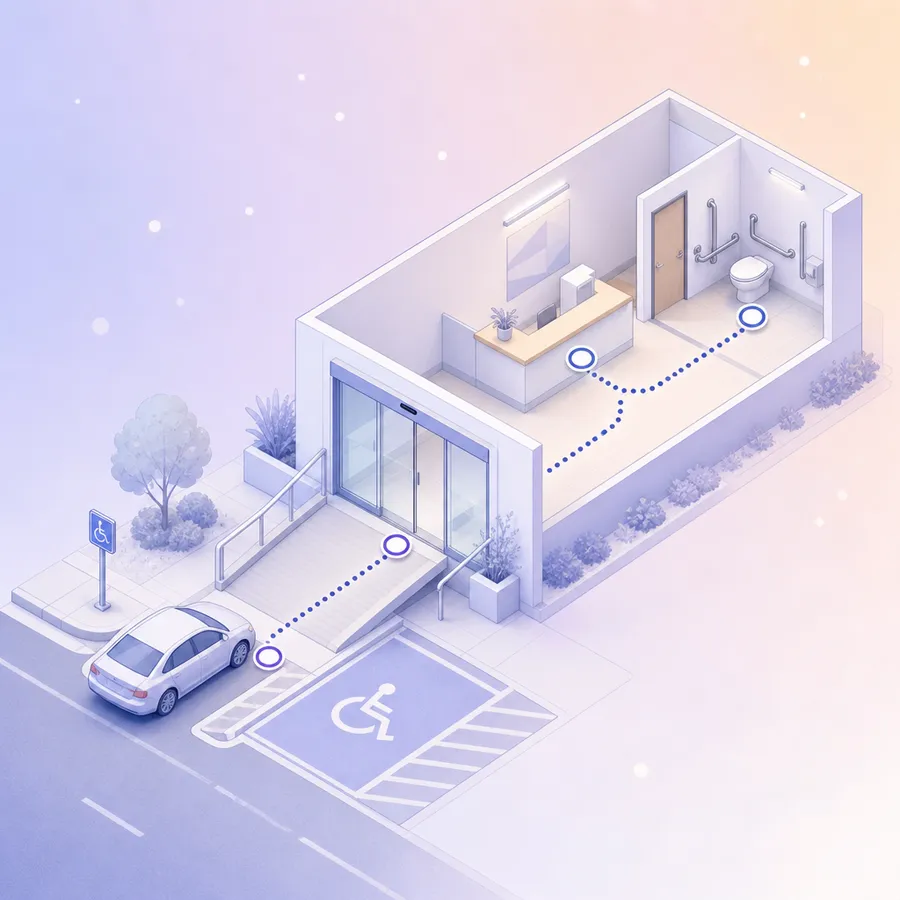
A low score shows where to look. The order below comes from the US rule on removing barriers in existing buildings, and ranks what to fix first.
| If this scores low | Check first | Fix order |
|---|---|---|
| Main entrance, parking, drop-off | The route from the street, parking or bus stop; steps; heavy doors | 1: getting in |
| Room to move, signs, quiet place | Aisles, counter height, tables, raised-letter signs, visual alarms | 2: where service happens |
| Accessible restroom | The way there, the door, grab bars, boxes stored inside | 3: restrooms |
| Emergency exits, everything else | An evacuation plan for people who cannot use stairs, then the rest of the list | 4: the rest |
The Department of Justice rule for businesses open to the public urges fixing access from sidewalks, parking and public transportation first, then the areas where goods and services are offered, then restrooms, then anything else.7 It ranks the work; for a compliance check, pair the survey with a professional access audit.
On the website, match low scores to the failures WebAIM finds most often: low contrast text on 83.9% of home pages, missing image descriptions on 53.1%, unlabeled form fields on 51%, empty links on 46.3% and empty buttons on 30.6%.4 The web set's statements on text, buttons and links, form fields and images point to exactly these.
An exit card with five access questions
Short on space? These five fit on one small card handed over at the exit, or in a two-minute link sent that evening. They cover reaching the place, finishing the visit, usable information, the main barrier and the fix a visitor wants.
- 01I could get where I needed to go.
- 02I could do everything I came to do.
- 03Information was in a form I could use.
- 04What made things hardest for you?
- 05What one change would make the biggest difference to you?
Copies for reception, with a read-aloud option
Some visitors will never fill in a form online, so an accessibility survey needs a paper route. Keep copies at reception, have staff ready to read each question out loud on request, and enter the paper answers before the week is out.
Printing for reception? and keep a copy behind the desk for staff to read aloud.
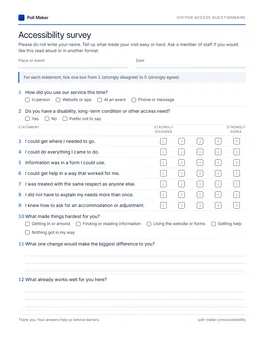
Visitor access questionnaire
Sheet one holds the twelve questions for any visit, ready to tick. Venue, website, event, access needs and the Washington Group questions come after it.
Download PDF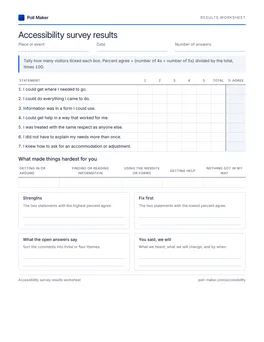
Results worksheet
Tally the seven access statements from paper copies, get a percent agreeing for every one, and count which barrier people named most.
Download PDFAccessibility questions that miss, and better wording
Most weak accessibility questions ask people to judge a standard they have never read. The survey question writing guide sets out the general rules; these four are about access alone.
Is our building ADA compliant?
Could you use the main entrance?
I could find and use an accessible restroom.
Visitors cannot judge a legal standard. They can tell you exactly where they got stuck.
Are you disabled?
Do you have difficulty walking or climbing steps? (one of the six Washington Group questions)
A one-word label is a poor screener. Questions about everyday activities give a figure you can compare across surveys and countries.
Do you require special assistance?
Do you have any access needs we can plan for?
"Special" sets people apart, and "assistance" assumes help rather than an arrangement. Neutral words make yes an easy answer.
How accessible is our website on a scale of 1 to 10?
Each form field told me what to enter.
Every button and link did what I expected.
One overall number gives a developer nothing to fix. A specific moment does.
Before you send an accessibility survey
What questions should an accessibility survey ask?
Start with whether people could reach the place, do what they came for, use the information and get help. Then ask what got in the way and what single fix would help them most. Add questions for your setting: the building, the website, an event or a booking form.
How do you ask about accessibility needs in a survey?
Ask everyone the same neutral question, such as "Do you have any access needs we can plan for?", then offer a list of arrangements to tick and a box for anything else. Ask how they want to be contacted, and confirm what you have booked.
How do you ask about disability in a survey?
Use the six Washington Group questions word for word, in their order, with their four answer options, and keep them optional. Count a disability when any answer is "a lot of difficulty" or "cannot do at all".2
How do I make my survey accessible?
Offer another format up front, use plain words and short answer lists, avoid grids and ranking questions, and give every image alt text.5 Never rely on color alone.6 Then have someone who uses a screen reader try it before it goes out.
Should an accessibility survey be anonymous?
Yes for the feedback survey, so people can describe barriers without a name attached. The access needs questions are the exception, because you need a name and a way to reach the person to arrange anything.
Learn what stops people at your door
Send the twelve any-setting questions to the builder and put the survey out after your next event or open day, or print the questionnaire and leave a stack at reception.