Free Event Registration Form Template
Fill your event without the spreadsheet chaos. Guests register in about a minute, and you get the door list, catering numbers and access needs in one place.
- Form Builder
- Event registration form
What is an event registration form?
An event registration form signs people up for an event and tells the organiser who is coming and what they need. A good one asks for a name and email, whether people will join in person or online, which sessions they want and, for in-person guests, guest names and dietary needs.
This is the real form. Fill it in to see what people will see. Nothing you type here is sent.
10 questions, about a minute to fill in. Free to publish, with no sign-up and no limit on responses.
Save your place
Register in about a minute. We will send everything you need before the day.
1. Your full name
2. Email
3. How will you join?
- In person
- Online
4. Which parts would you like to join?
- Main programme
- Hands-on workshop
- Drinks and networking afterwards
5. Is there anything that would help you take part fully? (optional)
- Step-free access
- Live captions
- Sign language interpreter
- A quiet space
- Something else
Next
What questions should an event registration form ask?
Ask for a name, an email, how people will join and which parts they want. For in-person guests, add how many guests, their names and dietary needs; access needs and a phone number can stay optional.
This template asks 10 questions, 7 of them required. 4 appear only when an earlier answer calls for them. Change any of them in the editor.
By Michael Hodge, BSc Psychology. Updated 25 November 2026.
Your full name
NameRequired
Email
EmailRequired
How will you join?
Pick oneIn person, OnlineRequired
Which parts would you like to join?
Pick anyMain programme, Hands-on workshop, Drinks and networking afterwardsRequired
How many guests are you bringing?
NumberRequired
Shown only when the answer to "How will you join?" is In person
Your guests' full names
Long answerRequired
Shown only when the answer to "How will you join?" is In person and "How many guests are you bringing?" is more than 0
Any dietary needs in your group?
Pick anyNone, Vegetarian, Vegan, Gluten free, Dairy free and 3 moreRequired
Shown only when the answer to "How will you join?" is In person
Is there anything that would help you take part fully? (optional)
Pick anyStep-free access, Live captions, Sign language interpreter, A quiet space, Something elseOptional
Mobile number for on-the-day updates (optional)
Phone numberOptional
Shown only when the answer to "How will you join?" is In person
Future events (optional)
Tick boxOptional
What makes a good event registration form?
A good registration form requires exactly what the door list and the catering need, and shows in-person questions only to people coming in person.
In person or online, sorted.
Online attendees never see questions about food, guests or the venue.
No overbooking.
The workshop has 30 places and shows how many are left, so it closes itself when full.
Guests made simple.
One number for how many guests, then their names for badges, whether it is one guest or five.
Food and access needs in a few taps.
Common dietary needs as ticks, plus step-free access, captions, interpreters and a quiet space, so you can plan ahead.
Nothing you do not need.
One name box, no title prefix, no photo upload, and a phone number only for on-the-day updates.
How does this event registration form compare with Tally, Jotform and Fillout?
Tally and Fillout require nothing and Jotform requires only a head count, so an organiser can receive blank registrations. This form always requires a name and email, and online guests skip the in-person questions.
| Poll MakerThis template | TallyEvent Registration Form Template | JotformEvent Registration Form | FilloutEvent Registration Form Template | |
|---|---|---|---|---|
| Questions | 106 for an online guest, 9 in person | 9All shown | 83 more for a guest | 73 more by answers, then a payment step |
| Required answers | 4 online, 6 in personName and email always | NoneA blank registration can arrive | 2A head count and a guest type | None |
| Time to fill in | About 40 s to 1 minAbout 2 min with guests | About 98 s | About 107 s | About 90 sPlus the payment step |
| Places | A 30-place workshop shows places leftOption limits stop overbooking | A workshop choice, no limit | Not asked | Not asked |
| Guests | How many, then their namesAny number of guests | Not asked | 3 overlapping questionsNames for one guest only | A seat scale, 2 name boxesAt most 2 guests |
| Also asks | Dietary needs, access needs, phone for the dayPhone optional, in person only | A badge photo, job title, company | A title prefix, contact number | Phone number, special requests |
Free form builder facts
Every Poll Maker form is free to build, publish and fill in, with no account for you or the people who answer. Poll Maker has been online since 2003. Checked 25 November 2026.
- No sign-up, even to publish
- Unlimited responses
- No ads on your form
- No account to respond
- 32 block types
- File uploads and signatures
- Logic rules and endings
- Themes, light or dark
- Share by link or QR code
- Embed on your site
- Results with charts
- CSV and Excel downloads
What does research say about event registration forms?
Registration completion falls as ticket choices multiply, while relevant questions cost committed registrants little.
Across 3,600+ events, registration completion fell from 93% with one ticket type to 83% with 11 or more.
Measured studyPheedLoop Event Data Lab
In the same data, events with 21 or more custom questions finished as well as or better than events with 1 or 2.
Measured studyPheedLoop Event Data Lab
Across 1,362 forms, the phone number had a mean abandonment of 6.28%, behind only the password and the email address.
Measured studyZuko form analytics
Ask about dietary needs when food is served, and about access needs such as wheelchair access or a sign language interpreter.
Expert opinionCvent
A marketing opt-in must be a separate, unticked box: silence or pre-ticked boxes are not consent.
Expert opinionUK Information Commissioner's Office
Optional questions for your kind of event
Add any of these in the editor when your event needs them. Each one is written to be answered in seconds.
Conferences and multi-day events
Which days will you attend?
Day one / Day two / Day three
Day passes fill rooms unevenly. Counting each day separately stops the second morning from being over-catered.
Which workshops would you like a place in?
Workshop A / Workshop B / Workshop C
Rename the options to your sessions. Small rooms fill fast, and this tells you which ones to move to a bigger space.
Will you come to the evening reception?
Yes / No
Evening events often have their own venue and their own bar tab, so they need their own number.
Name for your badge, if different
Short answer
People who go by a nickname or a shorter form of their name wear their badge more happily with the name they use.
Workshops and training
How much experience do you have with this topic?
None yet / Some / A lot
Lets the trainer pitch the session and pair beginners with people who have done it before.
What would you most like to learn?
Paragraph
Read these the week before and you can shape the session around what the room actually came for.
Will you bring a laptop?
Yes / No
Hands-on sessions need to know how many spare machines, chargers and power points to find.
Community, youth and sport
Emergency contact name
Name
Standard for youth events, sport and anything physical. Leave it out of a talk or a meetup; it is data you would only be storing.
Emergency contact phone number
Phone number
Goes with the contact name. Keep both lists printed and with the organiser on the day, not only in a dashboard.
Date of birth
Date
Only when an age limit or an insurance rule requires it. Collecting personal data because it might be useful later is not allowed under data protection law.2
May we include you in photos from the event?
Yes / No
Photographers can then avoid the people who said no, which matters most at youth and community events.
Webinars and online events
Which time zone will you watch from?
Short answer
Shows whether a repeat session in another time zone would fill, and helps you phrase reminder times.
What question would you like the speakers to answer?
Paragraph
Questions sent in advance make a better Q and A than waiting for the first brave hand, and speakers can prepare real answers.
A form people finish
Most registration forms lose people to length and doubt, not to the event. Three rules keep both down.
Every field has to be used on the day
Before a field goes in, name the person who will use the answer and when. In a lab study of 65 people filling in real registration forms, versions rewritten to 20 form-design guidelines were finished 18 to 33 percent faster than the originals.1 Data protection law points the same way: collect what you need, not what might come in handy.2
Say why you want each detail
A field label that explains itself, like "Email address (for your joining details)", gets filled in without a second thought. The UK government design system recommends exactly that for email fields, and advises against making people type their address twice unless testing shows it helps.3
Keep marketing consent separate and unticked
Registering for one event is not agreeing to a newsletter. Ask separately, leave both answers unselected, and record what people chose. Under UK data protection guidance, silence, inactivity and pre-ticked boxes are not consent.4
A sign-in sheet for the door
Walk-ins, lost confirmations and a patchy venue signal happen at every event. A paper sheet at the door catches all three.
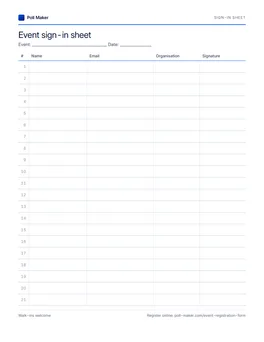
Printable event sign-in sheet
Twenty-one ruled rows for name, email, organisation and signature on one Letter page. Type the names into your form afterwards so every attendee ends up in one list.
What the confirmation should say
The thank-you screen is the first thing people see after they register, and the thing they come back to on the day.
The date, the start and finish time and, for online events, the time zone.
The full address with the entrance, the nearest station or parking, or when the online link will arrive.
What to bring: a ticket, photo ID, a laptop, comfortable shoes.
How to cancel, so the place goes to someone else instead of staying empty.
Who to contact with a question, by name.
Copy the same details into your reminder email the day before. People search their inbox for the event name, not for your organisation.
Event registration questions
Can I use this form for online and in-person events?
Yes. The first choice asks how people will join, and the in-person questions only appear for in-person attendees. If your event is only one kind, delete the other option.
Can I limit the number of places?
Yes. Any option can have a limit. The workshop in this template takes 30 people and shows how many places are left; when it is full, nobody else can pick it.
How do I collect guest names?
Attendees enter how many guests they are bringing, and if it is more than zero the form asks for their names, one per line, so you can print badges.
Should I ask about accessibility on an event registration form?
Yes, as an optional question. Asking early gives you time to arrange step-free access, captions or an interpreter. This template asks in a friendly, optional way.
Is this event registration form free?
Yes. The event registration form template and the form builder are free: build the form, publish it and collect responses with no account, no limit on responses and no ads on your form. Downloading every response as a CSV or Excel file is free too.
Can people pay for tickets with this form?
No. Poll Maker forms do not take payments. Use it for free events, or to collect registrations and send payment details separately.
Is it safe to ask for date of birth or emergency contacts?
Only ask when the event needs them, such as age limits, sport or youth activities, and say why in the label. Data protection rules require personal data to be limited to what is necessary.2
How do I handle walk-ins?
Print the sign-in sheet above for the door, then type those names into the form after the event so your attendance list is complete in one place.
- Seckler, M., Heinz, S., Bargas-Avila, J. A., Opwis, K. and Tuch, A. N. (2014). Designing usable web forms: empirical evaluation of web form improvement guidelines. CHI 2014. Completion time 25, 33 and 18 percent lower for the three improved forms; 65 participants. dl.acm.org/doi/10.1145/2556288.2557265
- Information Commissioner's Office. Principle (c): Data minimisation. ico.org.uk/for-organisations/uk-gdpr-guidance-and-resources/data-protection-principles/a-guide-to-the-data-protection-principles/data-minimisation/
- GOV.UK Design System. Email addresses. design-system.service.gov.uk/patterns/email-addresses/
- Information Commissioner's Office. What is valid consent? ico.org.uk/for-organisations/uk-gdpr-guidance-and-resources/lawful-basis/consent/what-is-valid-consent/
- GOV.UK Design System. Names. design-system.service.gov.uk/patterns/names/
- PulseFormCreator (My Plaza Pty Ltd). Form Field Index, updated 23 September 2026. Every visible field on 994 forms from 967 organisations; phone number on 659 of them. www.pulseformcreator.com/research/form-field-index/
More form templates
To count guests for a party, use the online RSVP form template; to take sign-ups for a club or a course, the online registration form; and to recruit helpers for a cause or an event, the volunteer form template. Each one opens in the free form builder, ready to change.
RSVP form
7 questionsabout 1 min
Use templateRegistration form
9 questionsabout 1 min
Use templateVolunteer sign-up form
11 questionsabout 2 min
Use template
For invitations with a yes or no and a headcount: RSVP form
For afterwards: event feedback form
Ask the audience how each talk went: presentation feedback survey
Want to start from scratch? Open the free form builder
Make this form yours in a minute
Change any question, add your own words and colours, then share one link. Free, with no sign-up to publish and no limit on responses.