Beta testing survey questions to catch problems before launch
Beta testing survey questions ask the people trying your pre-release product whether it worked, whether they could finish a real task, what broke and how they would feel if it went away. Start with the 12-question beta survey. Six stage sets cover the tester application, the first days, weekly check-ins, one feature, bug reports and launch.
- 38questions
- 12in the beta survey
- 4 minto answer the 12
- 6stage sets
By Michael Hodge, BSc Psychology Updated September 2026
Every beta question, from the tester application to launch day
The beta survey starts selected. Pick the stage sets you need and untick anything your product can skip. Every row shows the choices testers get and what their answer tells the team.
The beta survey: the core 1212 questions
Send it once testers have lived with the build for a week or more. How much they used it, seven statements on setup, stability and value, what went wrong, the product-market fit question and two open answers.
-
How often did you use the beta in the past week?
Every day4 to 6 days2 or 3 daysOnceNot at allWeights every answer below. Score question 10 for regular users only: Ellis recommends surveying people who used the product at least twice in the last two weeks.2
-
Setting up the beta and getting started was simple.
Strongly disagree12345Strongly agree1 = Strongly disagree, 5 = Strongly agreeFirst-run friction. A low score here drags every later rating down, so it is the first thing to fix.
-
I finished the main task I tried without help.
Strongly disagree12345Strongly agree1 = Strongly disagree, 5 = Strongly agreeTask success in the tester's own words, the statement closest to whether the product does its job.
-
The beta ran without crashes or freezes for me.
Strongly disagree12345Strongly agree1 = Strongly disagree, 5 = Strongly agreeStability from the tester's side, to read next to your crash reports.
-
The beta responded quickly in everyday use.
Strongly disagree12345Strongly agree1 = Strongly disagree, 5 = Strongly agreeSpeed as people feel it. A low score earns a look at the slowest screens before launch.
-
Menus, buttons and labels made sense to me.
Strongly disagree12345Strongly agree1 = Strongly disagree, 5 = Strongly agreeWording and layout. Fresh eyes catch the jargon a product team stopped noticing.
-
The beta does what its description promised.
Strongly disagree12345Strongly agree1 = Strongly disagree, 5 = Strongly agreeChecks your pitch against the product. A gap here is a messaging fix as much as a product one.
-
I plan to keep using it after the beta ends.
Strongly disagree12345Strongly agree1 = Strongly disagree, 5 = Strongly agreeIntent to stay. Compare it between the first and the last round of the beta.
-
Which of these did you run into?
Crash or freezeError messageWrong resultSlow screenConfusing stepNone of theseTick all that applyA quick count of problem types across every tester. The bug report form collects the detail.
-
How would you feel if you could no longer use this product?
Very disappointedSomewhat disappointedNot disappointedSean Ellis's product-market fit question, kept word for word so his benchmark applies: 40% or more very disappointed.2
-
What does it help you do that you could not do before?
Open answerThe benefit in your testers' words. Read it first for the people who chose very disappointed.
-
What is the one change you would make before launch?
Open answerOne change per tester. Sorted into themes, the answers become the fix list for the final build.
Tester application (people applying answer)5 questions
Put it on your sign-up page before anyone gets access. It picks testers who do the job your product is for, and records their devices and the tool they use now.
-
Which devices could you test on?
iPhone or iPadAndroidWindows PCMacOtherTick all that applyLets you cover every platform you will ship on, not just whoever applied first.
-
How often do you do the task this product is for?
Every dayEvery weekEvery monthRarelyNeverScreens for fit. People who never do the job cannot tell you whether the product does it well.
-
What do you use for this job today?
Open answerNames the tool you are really up against, and sets up the comparison question in the final days.
-
How much time could you give the beta each week?
Under 1 hour1 to 2 hours3 to 5 hoursOver 5 hoursSets expectations on both sides and tells you how many testers to accept.
-
What would you most like this product to do for you?
Open answerExpectations before first use. Set them beside the benefit answers at the end.
First two days: setup and first look4 questions
Send on day one or two, while installation and sign-in are still fresh. Four questions, about a minute.
-
How many minutes did setup take?
Under 55 to 1515 to 30Over 30Did not finishA number the team can act on. Anyone who did not finish needs a personal follow-up the same day.
-
How easy was it to install and sign in?
Very difficult12345Very easy1 = Very difficult, 5 = Very easyIsolates the very first step, where testers drop out before they have seen the product.
-
Was it clear what to try first?
YesPartlyNoTests the welcome screens and the invite email. Partly or No means the first task needs a signpost.
-
Where, if anywhere, did you get stuck?
Open answerAsked within a day, so testers still remember the screen and the step.
Weekly check-in4 questions
The same four questions at the end of every week, so each build can be set against the one before it.
-
How satisfied are you with this week's version?
Very dissatisfied12345Very satisfied1 = Very dissatisfied, 5 = Very satisfiedOne trend line across the beta. A dip points straight at the build that caused it.
-
Compared with last week's build, this one is:
Much worseWorseSameBetterMuch betterShows whether the fixes you shipped were noticed, and flags a regression within days.
-
On how many days did you use it this week?
None1 or 23 or 45 or moreRead the rating next to it: a tester who opened it once is judging a first impression.
-
What frustrated you most this week?
Open answerOne frustration per tester per week keeps the list short and current.
One feature, right after first use4 questions
Trigger it the first time a tester uses a new or changed feature. Put the feature's name into the questions in the builder.
-
How easy was it to do what you wanted with this feature?
Very difficult12345Very easy1 = Very difficult, 5 = Very easyEase for one feature at a time, so the score points at a single screen or flow.
-
How much does this feature matter to the way you work?
EssentialUsefulNice to haveNot neededSeparates the features people rely on from the ones they merely tried.
-
If this feature went away, what would you do?
Stop using the productUse it lessNot noticeAsked after real use, it measures value better than asking whether someone would use it.
-
What did you expect it to do that it did not?
Open answerFinds the gap between the feature and the picture of it testers brought with them.
Bug report form (fill it in when something breaks)5 questions
Keep the link in the beta menu and the welcome email. It asks for the things developers need to fix a fault: the steps, what happened and what should have happened.
-
What kind of problem was it?
Crash or freezeErrorWrong resultLooks wrongOtherRoutes the report to the right person before anyone reads the detail.
-
What were you doing? List the steps, one per line.
Open answerSteps to reproduce are the part of a bug report developers find most helpful.1
-
What happened, and what did you expect to happen?
Open answerObserved against expected behaviour: the gap between the two is the bug.1
-
Does it happen again if you repeat the steps?
Every timeSometimesOnly onceDid not tryA fault that repeats every time can be chased today. One that happened once needs the logs.
-
Device, system version and app version
Open answerLets the team rebuild the same setup before trying the steps.
Final days: launch readiness4 questions
Add these to the beta survey during the final days, when testers can weigh the product against what they used before.
-
How likely are you to recommend it to a friend or colleague?
0123456789100 = Not at all likely, 10 = Extremely likelyYour recommend score on launch day. Keep the wording after launch so the two numbers compare.
-
Compared with what you use now, it is:
Much worseWorseAbout the sameBetterMuch betterThe switching question. Read it beside the tool each tester named on their application.
-
What will you do when it launches?
Pay for itUse a free planWait and seeStop using itA first read on conversion from people who know the product well.
-
Who do you think would get the most out of it?
Open answerTesters describe your best customers in their own words. Superhuman built its target persona from this answer.2
A beta survey schedule, from sign-up to launch
Short sets at the right moments get more out of testers than one long survey at the end. This rhythm suits a beta of two to four weeks.
| When | Send | Questions |
|---|---|---|
| Before access | Tester application | 5 |
| Day 1 or 2 | First two days | 4 |
| End of each week | Weekly check-in | 4 |
| First use of a new feature | One feature | 4 |
| Whenever something breaks | Bug report form | 5 |
| Last 2 or 3 days | The core 12 plus Final days | 16 |
On Google Play, a new personal developer account has to keep at least 12 testers opted in to a closed test for 14 days in a row before it can apply for production access.3 That window holds the first-days set, two weekly check-ins and the core 12 on day 12 or 13, while every tester is still enrolled.
On TestFlight, testers can already send a marked-up screenshot, and crash reports reach you on their own.4 The surveys add what those channels do not collect: ratings you can compare week by week, and the reasons behind them.
Ready to launch? Score question 10
One number shows whether the beta has found its audience: the share of regular testers who would be very disappointed to lose the product.
Superhuman users who would be very disappointed without it
Sean Ellis put this question to users at nearly a hundred startups. Companies with strong traction almost always passed 40% very disappointed.2 When Hiten Shah asked 731 Slack users, 51% chose it.2
Work out your share
Keep only the testers who used the beta on two or more days in the past week (question 1). Divide the number who chose Very disappointed by everyone left. If 45 regular testers answer and 20 choose it, the share is 20 / 45 = 44%, over the 40% line.2
Raise it
Read question 11 for the very disappointed group first: the benefit they name is what your product is really for. Then find the somewhat disappointed testers who name that same benefit. Their answers to question 12 are the shortest path to a higher score. Superhuman ran this loop: its score rose from 22% to 33% once it focused on its core users, and reached 58% after three quarters of product work.2
Getting beta feedback your team can fix from
Four habits that decide whether tester answers turn into a clear fix list or a pile of opinions.

Ask within a day of the moment
People sum up an experience by its worst moment and by how it ended. In a study of 287 patients, remembered pain tracked the peak and the final three minutes, while the length of the procedure barely registered.5 One survey at the end of a beta hears mostly about the crash on day two and the final week. Ask about setup on day one, about a feature right after first use and about each week as it closes, and the final survey can focus on the verdict.

Ask for the steps when something breaks
In a survey of developers on the Apache, Eclipse and Mozilla projects, steps to reproduce stood out clearly from everything else a bug report can hold: 83% of the developers who had used them named them among the three most helpful items, against 33% for the observed behaviour and 22% for the expected behaviour.1 No developer who had used a severity rating put it in their top three.1 So the bug report form asks testers for steps, what happened, what should have happened and whether it repeats, and leaves severity to the team.
Accept testers who look like your launch customers
Google's advice for closed tests is to recruit testers who represent the app's intended future audience.3 The application set does that screening for you: it keeps people who do the job every week, on the devices you ship to, with time to give. A small group that matches your market gives clearer answers than a long list of the merely curious.
Show testers what their reports changed
Put two lines in every build note: what testers reported and what changed as a result. The weekly check-in then tells you whether they noticed, because its second question compares this build with the last one. Testers who see their reports acted on have every reason to keep sending them.
Testers gathered in a Slack, Discord or WhatsApp group? The day a new build ships, drop the build comparison into the chat as a one-question poll and watch the verdict come in. The poll how-to has a section on posting one in Slack and Discord.
Find the weakest part of the build
Type how many testers chose each point for the seven core statements. All of them are phrased so agreement means the product did well, so the shortest bar marks the first fix before launch.
- 1For every statement, count the testers who chose 4 or 5 and divide by all who answered it. The report fills in the bars for you.
- 2Statements 1 and 2 cover getting started, 3 to 5 cover how the build behaves, and 6 and 7 cover value. A short bar in the last pair is a product question rather than a bug.
- 3Take the two lowest bars, plus the matching answers to question 12, into the next planning meeting.
- 4Ship the fixes, send the core again in the final days, and put both charts in the build notes so testers see the change.
Core statements, this build
When the survey has to fit inside the app
When the survey has to fit in a small window inside the product, ask these five: did the main task work, did it hold up, what went wrong, the fit question and one change.
- 01I finished the main task I tried without help.
- 02The beta ran without crashes or freezes for me.
- 03Which of these did you run into?
- 04How would you feel if you could no longer use this product?
- 05What is the one change you would make before launch?
Filling in Google Play's production access form
After the 14-day closed test, Play Console asks how the test went before it opens production. Your survey answers cover most of the form.
| Play asks | Answer from | What to write |
|---|---|---|
| Did testers use every feature? | Questions 1 and 26 to 29 | Share who tried each feature and found it useful |
| Did usage match real users? | Questions 14 and 24 | Days used each week against how often testers do the task |
| Summarize the feedback | The core 12, questions 11 and 12 | The report chart, top themes, and which surveys you sent |
| What changed after the test? | Bug reports, question 23 | Faults fixed, and whether the next build rated better |
| How you judged it ready | Questions 10 and 36 | Your very disappointed share and the comparison with current tools |
| Who the app is for | Questions 38 and 14 | The testers who liked it most, described by them |
Google's help page is clear that you must summarize your testing feedback when you apply, and that the form also asks for your target audience and the changes the closed test led to.3 Keep the printed report and the open answers from each week together, and the application is mostly copying.
For testers sitting in the room with you
For playtests, hardware trials and sessions in a room, hand each tester the questionnaire with the device and gather the sheets before they leave. The PDFs are sized for US letter and A4.
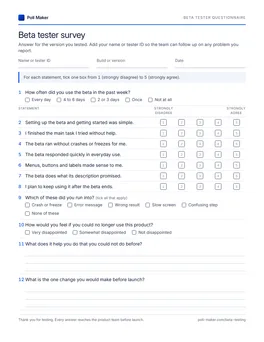
Beta tester questionnaire
Tester ID, build and date in the header, the beta survey first, then every stage set from application to launch.
Download PDF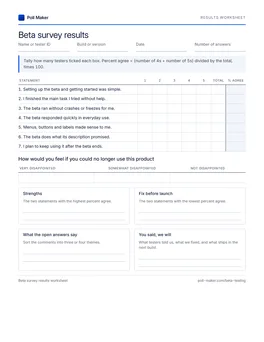
Beta results sheet
Tally the seven statements, count the very disappointed answers to get your share, and list what to fix before launch.
Download PDFWeak beta questions, and what to ask instead
Four common beta survey questions, each with a sharper version. For other topics, the survey question library has sets built the same way.
Did you like the beta?
The beta does what its description promised.
How would you feel if you could no longer use this product?
Invited testers feel obliged to be kind. Asking whether it kept its promise, and what losing it would mean, gets past politeness.
Did you find any bugs? Please describe them.
What were you doing? List the steps, one per line.
What happened, and what did you expect to happen?
A description alone rarely lets anyone repeat the fault. The steps and the expected result are what a developer needs.
How would you rate the speed, stability and design?
The beta ran without crashes or freezes for me.
The beta responded quickly in everyday use.
Three things in one question. A tester with a fast build that keeps crashing has no honest answer.
Would you use a feature that did this?
If this feature went away, what would you do?
A hypothetical invites a kind yes. Asking after real use, about losing the feature, shows what it is worth.
Before your first tester survey goes out
Short answers for founders, product managers and developers running a beta.
What questions should you ask beta testers?
Ask how much they used it, whether they could set it up and finish a real task, whether it held up, what went wrong and how they would feel if it went away. Add a bug report form for faults and a short weekly check-in, so problems reach you while testers still remember them.
How many questions should a beta survey have?
About 12 for the main survey, which takes around four minutes. Keep weekly check-ins to four questions and in-app prompts to five. Save longer forms for testers who signed up to give an hour or more a week.
How many beta testers do you need?
Enough to cover every platform and every kind of user you will launch to. Google Play requires new personal developer accounts to run a closed test with at least 12 testers for 14 days.3 For the very disappointed score, Rahul Vohra reports directionally correct results from around 40 respondents.2
What is the difference between beta testing and user acceptance testing?
Beta testers are outside users trying a near-final version in their own setting, and the question is whether they will adopt it. User acceptance testing is run by the business users who will work with a system, against criteria agreed in advance, to decide whether it goes live. For that job, use the UAT questionnaire.
Get the survey to testers before the next build
Type your product's name in the builder, choose the stage sets that fit, then paste the link into your invite email, build notes or tester group.