Implementing new software? What to ask staff, leads and vendors at each stage
Ask three groups before go-live. Your project lead settles the problem, scope and owner; your vendor answers on data, integrations, security and support; and the staff who will use the software tell you how they work now. All three are here, with the staff set ready to send.
- 33questions for staff
- 12in the core set
- 5 minto answer the core
- 26for the lead and vendor
By Michael Hodge, BSc Psychology Updated September 2026
The staff survey, set by set
Ticks already sit on the twelve core items. Bring in the current-process and must-have sets for requirements workshops, the demo set while you compare products, and the training set once the date is fixed. Every row lists the choices staff see and what the result means for your rollout.
The core 12, before go-live12 questions
Three questions that size up the current work, six statements on readiness, a training preference and two open questions. Send them while the plan can still change.
-
How much of your working week goes on the work this new software will handle?
Most of itAbout halfA few hoursRarelyNoneWeights every other answer. Heavy users feel a poor fit first, so read their scores on their own before the totals.
-
What do you use for this work today?
Current systemSpreadsheetsEmailPaperAnother appOtherTick all that applyAn inventory of what the new system replaces. Every spreadsheet named here is data someone must move or retire.
-
In a typical week, how much time do you lose to re-typing, searching or workarounds?
NoneUnder 1 hour1-3 hours3-5 hoursOver 5 hoursYour baseline. Ask the same question a few months after go-live and the difference is the time the project gave back.
-
I know what problem the new software should solve.
Strongly disagree12345Strongly agree1 = Strongly disagree, 5 = Strongly agreeIf staff cannot name the problem, they judge the software on habit and convenience. A low score calls for one plain reason, repeated often.
-
Someone has asked me how I do this work today.
Strongly disagree12345Strongly agree1 = Strongly disagree, 5 = Strongly agreeWhether the project has heard from the people who know the exceptions. Passing that knowledge to the build team is the participation research recommends for productivity.2
-
I know which tasks will move to the new system.
Strongly disagree12345Strongly agree1 = Strongly disagree, 5 = Strongly agreeClarity about personal impact. A low score by team shows where a short walkthrough of the new process is overdue.
-
Our current records are clean enough to move across.
Strongly disagree12345Strongly agree1 = Strongly disagree, 5 = Strongly agreeStaff know which records are stale or duplicated long before a migration test does. Disagreement puts data cleanup on the plan early.
-
I usually pick up new software for work quickly.
Strongly disagree12345Strongly agree1 = Strongly disagree, 5 = Strongly agreeConfidence with new tools. Teams that score low need more hands-on practice, not more slides.
-
I expect time to learn the new system before go-live.
Strongly disagree12345Strongly agree1 = Strongly disagree, 5 = Strongly agreeWhether training has room in the diary. If people expect to learn on the job, go-live week gets slow and noisy.
-
How would you most like to learn the new software?
Hands-on classShort videosWritten guideA colleaguePractice copyShapes the training plan around how this group learns. Count it by team: one format rarely suits a whole organization.
-
What is the one thing the new software must do well for your work?
Open answerOne must-have per person. Sort the answers into requirements and check each one appears in the vendor demo script.
-
What worries you most about switching to new software?
Open answerThe concerns to answer before go-live, in staff words. Answer the most common ones openly at the next team meeting.
How the work runs today5 questions
For requirements workshops. These map the current process from the desk, so the new setup copies what works and drops what does not.
-
Which task in this work takes you longest, and why?
Open answerThe first candidates for the new system to speed up. Invite a few of these people to walk the task through in a workshop.
-
How often do you type the same information into more than one place?
NeverRarelySometimesOftenAlwaysDouble entry marks the integrations and data links the new system has to cover.
-
Where do delays or mistakes usually start?
Missing detailsRe-typingApprovalsOld versionsHandoversOtherTick all that applyPoints at the step to redesign, not just the screen to replace.
-
How do you get the numbers or reports you need for this work?
From the systemI build my ownI ask someoneI go withoutReporting gaps. A private spreadsheet here is a report the new system should produce on day one.
-
What works well today that the new software must keep?
Open answerThe keep list. New systems often drop a small habit, such as a shortcut or a printed summary, that a team relied on.
Must-haves for the new software4 questions
Four features that often split teams. Each is rated must have, nice to have or not needed, so you count real priorities instead of reading wish lists.
-
Using it on a phone or tablet is:
Must haveNice to haveNot neededMobile need by role. Field and floor staff often say must have while office teams do not.
-
Running my own reports without help is:
Must haveNice to haveNot neededSelf-service reporting. A high must-have count means report building belongs in training, not only in the build.
-
Having my old records moved into it is:
Must haveNice to haveNot neededMigration scope. If most people say must have, budget time for cleanup and checking, not just the import.
-
Working when the internet connection drops is:
Must haveNice to haveNot neededOffline need. Rare in offices, common in vehicles, warehouses and remote sites. Check it before you pick a cloud-only product.
After a demo or trial4 questions
For the choosing stage. Staff answer after each vendor demo or free trial, and you compare the products side by side.
-
Which option would fit your work best?
Option AOption BOption CNone of themNot sureRename the options in the builder. A strong "none of them" result means the requirements, not the vendors, need another look.
-
In the demo I saw how I would do my main task.
Strongly disagree12345Strongly agree1 = Strongly disagree, 5 = Strongly agreeWhether the demo followed your process or the vendor script. Low scores mean asking for a demo built on your own scenarios.
-
Could you finish your main task in the trial without help?
Yes, easilyYes, after a whileOnly with helpDid not tryA practical test of ease, answered from doing rather than watching.
-
What did you not see that your work needs?
Open answerGaps to put to each vendor in writing before you compare prices.
Training and go-live support5 questions
Send these two to four weeks before go-live, once the date is fixed and people can plan around it.
-
When would training help you most?
Weeks beforeThe week beforeOn go-live dayThe weeks afterTiming preference. Skills from a session held long before go-live fade, so plan a refresher if many pick the first answer.
-
How much time could you give to training in the month before go-live?
Under 1 hour1 to 2 hoursHalf a dayA day or moreCapacity. Put the answers next to the hours the vendor says training takes.
-
Would you like to be a go-to person (a super user) for your team?
YesMaybe, tell me moreNo thanksFinds volunteers. How super users are chosen shapes how engaged they are, so start with the people who say yes.4
-
What help do you want in the first two weeks after go-live?
Floor supportHelp desk or chatQuick reference cardShort videosPractice copyTick all that applyPlans the extra support for the first weeks. Staff the most-ticked options before the date arrives.
-
Which dates would be the worst time for your team to switch?
Open answerMonth ends, peak seasons and audits. One clash found now saves moving the go-live date at short notice.
About you (optional)3 questions
Add these to compare teams or roles, and only report a group with enough people in it that no answer points back to one person.
-
How will you use the new software?
Every dayNow and thenI manage usersI support systemsDaily users, managers and support staff want different things from one system. Report them apart.
-
Which team or location are you in?
Open answerLets you plan training and go-live dates team by team when the rollout is staged.
-
How long have you done this kind of work?
Under a year1 to 3 years3 to 10 yearsOver 10 yearsLong-serving staff know the rare cases; newer staff remember what was hard to learn. The plan needs both views.
Nine questions for the project lead to settle first
For whoever owns the project and signs off the budget. Write the answers down: each becomes a line in the plan, and a vague answer shows where the rollout is exposed.
| Ask | Why it matters | A good answer |
|---|---|---|
| What problem are we fixing, in one sentence? | Every later choice is checked against it | "Orders take two days to confirm; we want same day." |
| What does the current setup cost us each year? | It sets the case and the budget ceiling | A figure in hours or money, not "a lot" |
| What must work on day one, and what can wait? | Scope that keeps growing delays go-live | A short day-one list with a sign-off |
| Who owns the rollout, and how much of their week? | Projects nobody owns drift | A named person with protected time |
| Which records move across, and who cleans them? | Bad data makes new reports wrong from day one | A data owner and a cleanup date |
| Who needs training, in what format, and when? | A plan that ignores how people learn gets skipped | A plan built from the staff answers |
| When is the worst week to go live? | Month ends and peak seasons clash | Dates checked with every team |
| What will we measure 90 days after go-live? | Without a before figure, benefits are guesswork | Two or three numbers, taken before and after |
| What happens if go-live goes wrong? | A fallback is easier to agree while things are calm | Written rollback triggers and an owner |
Two of these answers come straight from the staff survey: question 3 gives the hours lost today, and question 10 the training format people want. Send the core 12 before this list is signed off, not after.
Technical questions to ask the vendor before you sign
Seventeen questions for demos and contract talks, grouped the way an IT lead checks them. Ask for the answers in writing so they can go into the contract.
Data and migration
- How do our current records get in: file import, API, or a migration your team runs?
- Who checks the imported records, and how are errors reported back to us?
- Can we export all our data in a standard format at any time, including if we leave?
Integrations
- Which of our current tools does it connect to without custom work?
- Is the API documented, and what limits apply to it?
- When you release an update, what can break on our side, and who fixes it?
Security and access
- Is single sign-on with our identity provider included at no extra cost?
- Is multi-factor authentication switched on by default for every user?
- Are there any default passwords anywhere in the product?
- Which audit logs do we get, and how long are they kept?
- Do you publish a vulnerability disclosure policy?
- Can we see an independent security audit report?
Reliability, support and references
- What uptime does the contract commit to, and what happens if you miss it?
- How often is our data backed up, and how quickly can you restore it?
- Do we get a test copy of the system for training and trying changes?
- Who supports us in go-live week, and during which hours?
- Can we speak to two customers our size who went live in the past year?
The security questions follow the Secure by Demand guide from CISA and the FBI. It asks buyers to expect single sign-on and multi-factor authentication at no extra cost, no default passwords, a public vulnerability disclosure policy and, for cloud products, security logs kept for at least six months.5 Send the list before the demo, so the vendor shows the answers on screen instead of promising them later.
Getting useful answers before go-live
Four habits make a pre-implementation survey change the plan rather than rubber-stamp it.
Ask before the requirements are signed off
Once the specification is agreed, staff answers can only change the training plan. Asked earlier, they change what gets built. A meta-analysis of 82 studies found user participation modestly helpful and advised designing it for a purpose: a real sense of involvement where acceptance is the goal, and knowledge of the work for the build team where productivity is.2 The core covers both. Questions 4 to 9 read involvement and readiness, while the open questions and the current-process set collect the knowledge.
What IT managers said makes a software project succeed
Treat user input as the first success factor
In the Standish Group CHAOS survey of 365 IT executive managers, user involvement was the most cited reason projects succeeded (15.9% of responses), and lack of user input the most cited reason they ran late, over budget or short of features (12.8%).1 Later research is more measured. A review of 87 studies found 52 where involvement helped, 12 suggesting it hurt and 23 unclear, and lists who is involved, how deeply and at what stage among the factors claimed to shape the result.3 Asking everyone who will use the system, early and in the same words, settles the who and the when.
Choose super users who volunteer
A super user is the colleague on each team who learns the system early and helps others through the first weeks. When one hospital moved to a new electronic health record, researchers followed two units. The unit whose super users were proactive, explained the reasons behind each step and shared information freely saw clinicians gain more skill with the system. How managers selected those super users shaped how engaged they were.4 Question 28 asks who wants the role, so you start with willing people.
Record the hours lost now
Benefits are hard to prove without a before figure. Question 3 gives you the hours each person loses per week to re-typing and workarounds, split by team if you add the About you set. Repeat it in the review once the system has bedded in, and the saving shows up in hours rather than impressions.
At the kickoff meeting, a single question warms up the room. Show the learning question and have people vote through a live poll; your training plan then begins with a real count. Never set one up? Our poll making guide shows each step.
Read readiness by team before go-live
Type in how many chose each answer on the six readiness statements. Ranked bars follow, and the bottom two tell you what to fix before the date.
- 1Give each statement a readiness rate: its Agree and Strongly agree votes divided by every vote the statement got.
- 2Break the results down by the opening question on share of the week. A low score from people who spend most of their week on this work is the one to act on first.
- 3Match each low statement to a fix: a plain reason for the change, a process walkthrough, a data cleanup, practice sessions or protected training time.
- 4Send the six statements again two weeks before go-live and check that the lowest two have moved.
Readiness statements, core 12
Matching each set to a project stage
The survey works best in parts, sent as the project moves. Leave the core wording untouched between sends, so each round reads against the one before.
| Project stage | Answered by | Send |
|---|---|---|
| Choosing a product | Staff at each demo or trial | After a demo or trial |
| Planning, 6 to 8 weeks before go-live | Everyone who will use it | Core 12, current process, must-haves |
| 2 to 4 weeks before go-live | Everyone who will use it | Training set, plus the six readiness statements again |
| Testing the build | Business testers | A user acceptance testing questionnaire |
| 1 to 3 months after go-live | Everyone using it | A post implementation review |
The second send of the readiness statements (questions 4 to 9) tells you whether the rollout messages and training have landed. If a score has not moved since planning, deal with it now, while go-live can still wait a week.
Short on time at kickoff? Start with these five
No time for the full set? These five give you the hours lost today, whether the reason for the change has landed, whether training has room in the diary, and each person's must-have and biggest worry.
- 01In a typical week, how much time do you lose to re-typing, searching or workarounds?
- 02I know what problem the new software should solve.
- 03I expect time to learn the new system before go-live.
- 04What is the one thing the new software must do well for your work?
- 05What worries you most about switching to new software?
Pass it round at the team briefing
Handy at a team briefing, or for staff who rarely log in until the new system arrives. Pass copies round, gather them in an envelope, and enter the counts in the report builder above.
Only need the kickoff five on paper?
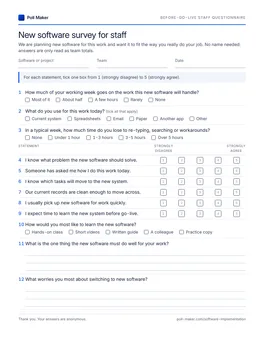
Staff questionnaire
Space for the software name, team and date. Page one holds all twelve core items; current process, must-haves, training, demo and About you follow.
Download PDF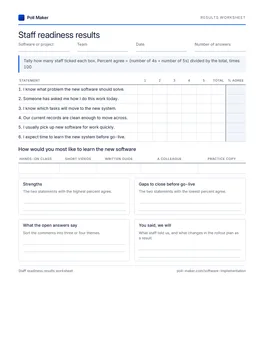
Readiness tally sheet
Tally the learning-format votes and the six readiness statements, convert each to a percent ready, and note the two weakest for the plan.
Download PDFRollout survey questions that miss, and sharper versions
Four questions that turn up in home-made rollout surveys, each paired with a version from this set. The survey questions guide covers the general rules.
Are you excited about the new software?
I know what problem the new software should solve.
Excitement is a mood, and people give the answer they think is expected. Knowing the reason is something a message can fix.
What features would you like?
What is the one thing the new software must do well for your work?
Running my own reports without help is: Must have, Nice to have, Not needed
An open wish list grows without limit. One must-have each, plus fixed ratings, gives priorities you can count.
Do you need training?
How would you most like to learn the new software?
How much time could you give to training in the month before go-live?
Nearly everyone says yes. Format and free hours are what the training plan actually needs.
Is the old system bad?
In a typical week, how much time do you lose to re-typing, searching or workarounds?
The weak version leads the answer and gives no number. Time lost is a baseline you can measure again after go-live.
Implementing new software: short answers
For IT leads, operations managers and business owners planning a new system.
What questions should you ask before implementing new software?
Ask three groups. The project lead answers what problem you are fixing, what must work on day one, who owns the rollout and how you will measure success. The vendor answers on data, integrations, security and support. The staff who will use the system tell you how they work now, what they need and how they want to learn.
Why do software implementations fail?
In the Standish Group CHAOS survey, IT managers named lack of user input (12.8%), incomplete requirements (12.3%) and changing requirements (11.8%) as the top reasons projects were challenged.1 All three start long before go-live, which is why the staff survey comes first.
When should you survey staff about new software?
First while you are still choosing and planning, about six to eight weeks before go-live, so the answers can change requirements. Again two to four weeks before go-live, for training and support. After go-live, switch to a post implementation review.
Should a pre-implementation survey be anonymous?
For the core and training sets, yes. People admit to workarounds, messy records and low confidence more readily without a name. For the super user question, add an optional name box next to it in the builder so you can contact the volunteers.
How do you get employees to use new software?
Involve them before the build, give them time to learn close to the date, and put a volunteer super user in every team. The survey tells you where understanding is thin, which training format and how many hours people can give, and who wants to help.
Send the core 12 before the plan is final
Name the software in the title, choose the sets this stage calls for, and share the link with each team due to use it. Paper copies work for people who spend the day on their feet.