Post implementation review questions: a 35-question survey that shows what go-live missed
A post implementation review asks whether the change delivered what it promised. These questions put that to the people who now work with it every day: does it solve the original problem, what do they still do around it, and should it stay as it is. Send the core 12 once the system has settled, then add the set your review needs.
- 35questions
- 12in the core review
- 5 minto answer the core
- 1 setfor the project team
By Michael Hodge, BSc Psychology Updated September 2026
All 35 post implementation review questions
The core is ticked. Add the day-to-day set early, rollout when the review feeds the next project, results after a full business cycle, and the lessons learned set for the project team. Beside each item sit the choices people get, with a note on how that result feeds the review.
The core 12 review questions12 questions
One question on how far people have really moved across, eight statements they can judge from their own work, a keep or roll back verdict and two open questions.
-
Which best describes how you do this work now?
All of it in the new systemMost of it, with some side stepsAbout half, the rest the old wayMostly the old wayI do not use itReal adoption, not logins. Read every rating below against how far each person has actually switched.3
-
The new system has solved the problem it was brought in to fix.
Strongly disagree12345Strongly agree1 = Strongly disagree, 5 = Strongly agreeThe first question any review has to answer. A low score here outweighs good scores everywhere else.1
-
The new system does what we were told it would do.
Strongly disagree12345Strongly agree1 = Strongly disagree, 5 = Strongly agreePromise against delivery. When expectations are not met, satisfaction drops even if the system works.4
-
My routine tasks take less time than before the change.
Strongly disagree12345Strongly agree1 = Strongly disagree, 5 = Strongly agreeA before and after on time, the benefit most business cases count first.
-
I spend less time fixing errors than I did the old way.
Strongly disagree12345Strongly agree1 = Strongly disagree, 5 = Strongly agreeRework is where a change quietly pays or costs. Match it against error or ticket counts if you have them.
-
The information I get from it is accurate and up to date.
Strongly disagree12345Strongly agree1 = Strongly disagree, 5 = Strongly agreeData quality as users meet it. People stop trusting a system over one bad report.
-
We were told early enough what was changing and when.
Strongly disagree12345Strongly agree1 = Strongly disagree, 5 = Strongly agreeRollout communication, judged after the event when people know what they needed to hear.
-
By go-live day, I knew how to do my main tasks the new way.
Strongly disagree12345Strongly agree1 = Strongly disagree, 5 = Strongly agreeReadiness at cutover. Low scores explain a rough first month better than any defect list.
-
Problems I have reported since go-live get fixed.
Strongly disagree12345Strongly agree1 = Strongly disagree, 5 = Strongly agreeSupport after launch. If this is low, people stop reporting and start working around.
-
Knowing what you know now, what should we do with this change?
Keep it as it isKeep it, with fixesNot sure yetGo back to the old wayThe verdict in one line. Count the fixes answers by team: they show where the next round of work goes.
-
What still does not work the way it should?
Open answerThe open issues list in staff words. Sort answers by process step, then compare with the support log.
-
If we made a change like this again, what should we do differently?
Open answerLessons learned from the people on the receiving end, which project teams rarely hear directly.
Day to day: side steps and use4 questions
Add these a month or two in. They find the spreadsheets, paper forms and double entry that keep the old way alive.
-
Which of these do you still do outside the new system?
Keep my own spreadsheetUse paper notes or formsAsk a colleague to do steps for meUse parts of the old systemEnter the same data twiceNone of theseTick all that applyWorkarounds, named one by one. Each ticked box is a gap in the design or the training.5
-
If you use a side step, what does it give you that the new system does not?
Open answerThe reason behind the workaround. Often it is a missing report or field that takes a day to add.
-
How much of what the system offers your role do you use?
Only the basicsThe basics and a few extrasMost of what my role needsEverything my role needsNot sure what else it doesFeature breadth. People settle into a narrow band early, so a refresher can pay off months after launch.3
-
When you get stuck, what do you usually do first?
Ask a colleagueCheck the help guideContact the help deskWork it out myselfGo back to the old wayShows which support route people really use. The last answer is the one to chase.
How the rollout went5 questions
For reviews that feed the next project plan. Staff judge the communication, cutover and early support with hindsight.
-
I understood why the change was being made.
Strongly disagree12345Strongly agree1 = Strongly disagree, 5 = Strongly agreeThe case for change as staff heard it. Low scores here drag down every other rollout score.
-
Go-live day went the way we were told it would.
Strongly disagree12345Strongly agree1 = Strongly disagree, 5 = Strongly agreeCutover against the plan people were given, not against the plan on paper.
-
Someone was on hand to help in the first weeks after go-live.
Strongly disagree12345Strongly agree1 = Strongly disagree, 5 = Strongly agreeFloor support in the settling-in period, the part of a rollout budget cut most often.
-
The project team listened to concerns raised by my team.
Strongly disagree12345Strongly agree1 = Strongly disagree, 5 = Strongly agreeVoice during the project. Teams that felt unheard rate the whole change lower.
-
What one thing about the rollout would you change?
Open answerOne change per person keeps the answers specific enough to plan around.
Results and benefits5 questions
Send these after at least one full business cycle, such as a month end or a quarter close, when the benefits have had time to show.
-
Since the change, which of these have improved for you?
Time on routine tasksFewer errors to fixFinding informationReports I rely onLess double entryService to customersNothing yetTick all that applyA benefits checklist in the user's terms. Put it beside the benefits named in the business case.
-
In a typical week, how much time does the change save or cost you?
Saves over 2 hoursSaves 1 to 2 hoursSaves under an hourNo differenceCosts me timeA rough time figure you can multiply by headcount. Treat it as an estimate and say so in the report.
-
People who rely on my work get it sooner than before.
Strongly disagree12345Strongly agree1 = Strongly disagree, 5 = Strongly agreeThe benefit as the next person in the chain sees it, which is where most process gains land.
-
The change was worth the disruption it caused.
Strongly disagree12345Strongly agree1 = Strongly disagree, 5 = Strongly agreeCost against benefit from the desk. A split result usually tracks the teams that got the least support.
-
What benefit did you expect that has not arrived yet?
Open answerThe benefit gap. These answers become the follow-up actions in the review report.
Lessons learned (the project team answers)6 questions
A separate short form for the people who ran the project. Send it at project close, then read it next to what staff said.
-
The project goals were clear to everyone on the team from the start.
Strongly disagree12345Strongly agree1 = Strongly disagree, 5 = Strongly agreeGoal clarity. When staff and team scores on the problem question differ, unclear goals are usually why.
-
Changes to scope were agreed and recorded before work started on them.
Strongly disagree12345Strongly agree1 = Strongly disagree, 5 = Strongly agreeScope control, the most common source of late delivery a team can see from inside.
-
Risks were raised early enough to act on them.
Strongly disagree12345Strongly agree1 = Strongly disagree, 5 = Strongly agreeWhether the team felt able to raise bad news in time.
-
How did the project finish against its plan?
On time and on budgetOn time, over budgetLate, on budgetLate and over budgetNot sureThe team's own view of delivery. Check it against the actual figures before the review meeting.
-
What worked on this project that the next one should copy?
Open answerThe keep list. Lessons learned logs are usually all problems and no practices worth repeating.
-
What caused the most rework or delay, and how could it be avoided?
Open answerOne cause and one prevention per person, ready for the lessons learned log.
About you (optional)3 questions
Use these when you compare groups, and skip any team so small that its answers could identify someone.
-
How do you work with the new system?
Every dayNow and thenI manage people who use itSupport or adminThe split to read every result by. Managers and daily users often see a different change.
-
When did you start using it?
From go-live dayIn the first monthLater than thatLate starters missed the launch support, so their scores show what the steady state feels like.
-
Which team or site do you work in?
Open answerLets you report by area when the change reached several teams on different dates.
What each review question needs from the survey
A post implementation review answers a few big questions. The survey supplies the staff evidence for each one; the rest comes from figures you already hold.
| The review asks | Survey questions | Put it next to |
|---|---|---|
| Did it solve the problem? | 2, 3, 10 | The problem statement in the business case |
| Did the benefits arrive? | 4, 5, 6 and the results set | Baseline and current KPIs |
| Is it really in use? | 1 and the day-to-day set | Login and usage reports |
| How well was it rolled out? | 7, 8, 9 and the rollout set | Support tickets since go-live |
| What do we learn? | 11, 12 and the project team set | The risk and issue logs |
Reading it: a worked example
Say 40 staff answer the core three months after a new ordering system went live. Thirty-one agree it solved the problem it was brought in for, but only 18 agree it does what they were told it would. Twelve people say they still do about half their work the old way, and nine of those are in the warehouse team. On the verdict question, 22 choose keep it with fixes and only two choose go back.
The finding writes itself. The system works; the promise was oversold, and one team never fully moved across. The actions are a short note correcting what the system does and does not do, and a day on the warehouse floor to find out which side steps they rely on. Send the day-to-day set to that team first.
Making the review change something
Four choices decide whether the review changes anything or just gets filed.

Wait for one full business cycle
Ask too early and you measure the teething problems. Mindtools advises waiting a few weeks or even a few months, and where possible allowing "at least one, full, successful cycle of business" before reviewing lessons learned.1 For a finance system that means after a month end; for a rostering tool, after a full roster period. Send the five-question check at 30 days so nothing festers while you wait.
Projects that met or exceeded objectives, by quality of change management
Ask how the change was run, not only how the system works
How a change is led shapes whether it pays off. In Prosci's benchmarking of more than 2,600 practitioners, 88% of projects with excellent change management met or exceeded their objectives, against 13% of those where it was poor.2 So the core covers notice, readiness and support alongside results: when outcomes disappoint, those answers show whether to fix the system or the rollout.

Go looking for the workarounds
Low use rarely shows up as a complaint. It shows up as a private spreadsheet or a colleague who does the tricky steps for everyone. Research on post-adoption use finds that most people use a narrow band of features and rarely extend them,3 and workarounds are the everyday way people get past a system that blocks them.5 The first core question and the day-to-day set ask about them directly, without blame.

Compare the promise with the result
Satisfaction with a system depends partly on whether it met what people expected.4 So the core keeps two questions apart: did it solve the problem, and does it do what staff were told. A gap between them points at the launch messages, not the build. Bring the original business case to the review meeting and read the answers against it line by line.
At the review meeting, ask the room before you show the slides. Ask the keep or roll back question through a live poll that people answer on their phones, then compare the room with the survey. Projector tips are in our poll how-to.
Turn staff answers into review findings
For the eight core statements, type in the count for each of the five answers. The shortest bars are the findings your review report opens with.
- 1Tally every statement. Each bar is the proportion answering Agree or Strongly agree.
- 2Read the first two statements as a pair. Problem solved but promise missed means fix the message; both low means fix the system.
- 3Split the results by the adoption question that opens the survey. People who still work mostly the old way explain most low scores.
- 4Give each of the two lowest statements an owner and a date, then repeat the core once the next business cycle closes.
Core review statements
Who answers, and when to send each set
One survey on one day misses most of the story. Spread the sets over the months after go-live.
| When | Who answers | Send |
|---|---|---|
| About 30 days after go-live | Staff using it | The five-question check |
| Once the main problems are ironed out | Staff using it | The core 12, day to day, rollout |
| At project close | The project team | Lessons learned (6) |
| After a full business cycle | Staff using it | The core 12 again, plus results |
Keep the core wording the same each time so the rounds line up. If testers signed the release off before launch, their UAT questionnaire answers make a useful first column. For the wider staff mood about the change, beyond this one system, pair it with a change management survey.
A 30-day pulse before the full review
A month after go-live, before the full review, five questions tell you whether it is on track: the original problem, the promise, support, the verdict and what is still broken.
- 01The new system has solved the problem it was brought in to fix.
- 02The new system does what we were told it would do.
- 03Problems I have reported since go-live get fixed.
- 04Knowing what you know now, what should we do with this change?
- 05What still does not work the way it should?
Copies for the shift briefing and the closed tray
Useful for teams without a desk, such as warehouse, ward or shop floor staff. Pass copies round at a shift briefing and drop the finished ones in a closed tray. Each file fits a letter or A4 sheet.
Reviewing one team only? for their shift briefing.
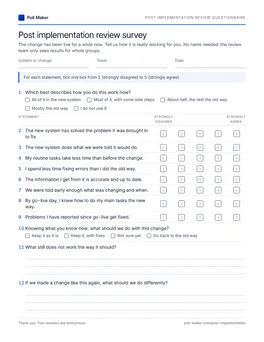
Review questionnaire
System, team and date at the top, then the core 12, the day-to-day, rollout and results sets, the project team set and About you.
Download PDF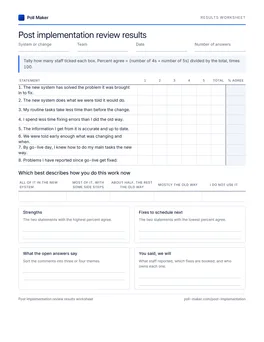
Review tally sheet
Count how far people have switched, tally each core statement, find the share agreeing and list the fixes to book.
Download PDFStock review questions that invite a shrug
Four questions turn up on nearly every home-made review survey, and each gets a vague answer. For the general rules of wording, see our survey question guide.
Was the implementation a success?
The new system has solved the problem it was brought in to fix.
Success means a different thing to the sponsor and the clerk. Tie the question to the problem the project set out to fix.
How satisfied are you with the new system and the training?
The new system does what we were told it would do.
By go-live day, I knew how to do my main tasks the new way.
It bundles two topics. A low score could mean either, and nobody can act on it.
Are you using the new system?
Which best describes how you do this work now? (All of it in the new system ... I do not use it)
A yes hides the side steps. A scale of how far people moved across shows the real adoption.
Any other comments?
What still does not work the way it should?
A catch-all gets blank boxes. A named question gets a list of open issues.
What project leads ask about PIR surveys
For project managers, PMO leads and business analysts planning the review.
What questions should a post implementation review ask?
Three at the top: did the change solve the problem it was meant to fix, did the expected benefits arrive, and what should the next project learn.1 The survey puts those to staff as specific statements, and the review team adds figures such as KPIs, costs and support tickets.
When should a post implementation review be done?
Once the early problems are ironed out, usually a few weeks to a few months after go-live, and ideally after one full business cycle.1 A short check at 30 days catches urgent issues in the meantime.
Who should fill in a post implementation survey?
The staff who use the new system or process every day, their managers, and support staff. The project team answers its own lessons learned set, so the two views can be compared rather than blended.
Should the survey be anonymous?
For staff, yes. Staff admit to workarounds and weak support far more readily when their name stays off the form. Report by team only where the group is large enough. The project team set can carry names, since it feeds a lessons learned log.
Can I use it after rolling out a new benefits plan or policy?
Yes. Swap "the new system" for the name of the plan or policy. The core, rollout and results sets work as they are; drop the day-to-day set if there is no software involved.
Start the review with the core 12
Type the name of your system or change into the survey title, tick whichever extra sets this review calls for, then email the link to every team working with it, or print copies for a shift briefing.