Security survey checklist: 36 questions for walking any site
A security survey is a walk-through of a site that finds its weak points and ends with a list of fixes. These 36 questions give every weak point an answer you can record: the first 12 form the core, rated as you walk from the boundary to the most valuable room, and five optional sets cover the rest.
- 36questions
- 12in the walk-through core
- 8areas rated 1 to 5
- 2walks: day and night
By Michael Hodge, BSc Psychology Updated September 2026
All 36 security survey questions
Under every question: the choices the surveyor picks from and what their pick reveals about the site. Tick the ones that fit your site, then open them in the form builder, print them for a clipboard, or copy them into another tool.
The walk-through core12 questions
Eight areas rated from very poor to excellent, two tests you carry out on the spot, and the two answers every report needs. They follow the order of the walk.
-
How would you rate the fences, walls and gates?
Very poor12345Excellent1 = Very poor, 5 = ExcellentThe first layer, or the building line where there is no fence. Gaps and open gates decide how close someone gets unseen.
-
How well lit are the entrances and car park at night?
Very poor12345Excellent1 = Very poor, 5 = ExcellentRate it on the night walk, paths included. Dark doorways and car park corners are where trouble starts after hours.
-
How would you rate the outside doors and their locks?
Very poor12345Excellent1 = Very poor, 5 = ExcellentCount the side, back and fire doors too. The weakest door sets the level for the whole building.
-
How would you rate windows, skylights and hatches?
Very poor12345Excellent1 = Very poor, 5 = ExcellentThe openings owners forget. A strong front door means little next to a window with a broken latch.
-
How well can staff see who is coming to the entrance?
Very poor12345Excellent1 = Very poor, 5 = ExcellentClear sightlines from reception and glass panels let staff spot a problem before it reaches the door.
-
How would you rate control of keys, codes and cards?
Very poor12345Excellent1 = Very poor, 5 = ExcellentWho holds what, and whether leavers hand them back. Losing track of keys quietly undoes every lock on the site.
-
How well are visitors signed in and escorted?
Very poor12345Excellent1 = Very poor, 5 = ExcellentContractors count too. Shows whether a stranger inside the building would stand out or blend in.
-
How well do the alarm and cameras cover each entrance?
Very poor12345Excellent1 = Very poor, 5 = ExcellentCoverage, not the number of devices. Stand at each door, then by the valuables, and ask what would be caught there.
-
Could you reach a staff-only area without being stopped or asked who you were?
No, stopped at onceYes, one areaYes, several areasNot testedThe test that sums up the rest. It gives you a plain fact to test again once the fixes are in.
-
How many outside doors or windows did you find left open, propped or broken?
NoneOneTwo or threeFour or moreA count, not an opinion. Note where each one was so it can be fixed by name.
-
Which areas need action first?
BoundaryLightingDoorsWindowsKeysVisitorsAlarmRoutinesTick all that applyYour call as the surveyor. Across several sites it shows which fixes to buy once for everyone.
-
What is the most serious weakness you found, and exactly where is it?
Open answerLocation and photo number, so whoever fixes it can find it without you there.
Before you walk5 questions
Five questions to settle at the desk with the site manager. They tell you where to look hardest and which sets to add.
-
What kind of site is this?
OfficeShop or branchWarehouse or yardSchool or campusHall or place of worshipShapes the rest of the walk: a shop needs the cash questions, a school the visitor ones.
-
When is the site empty?
Never, it runs day and nightOvernightNights and weekendsFor weeks at a timeThe longer the site sits empty, the more the alarm, locks and lighting must do on their own.
-
What has happened here in the last 12 months?
Break-in or attemptTheft by an outsiderTheft from insideVandalism or graffitiTrespassThreats to staffNothing recordedTick all that applyPast incidents show where to spend the most time on the walk.
-
Which part of the site feels least secure to the people who work here?
Car parkMain entranceSide or back doorsLoading areaStairs and corridorsAsk staff before you set off. Their answer points you to the spot to check twice.
-
What most needs protecting on this site?
Staff and visitorsCashStockEquipment and ITRecordsTick all that applyThe walk ends here. Rate the layers around these things hardest.
Grounds and lighting5 questions
For any site with its own car park, yard or grounds. Walk this set twice, once in daylight and once after dark.
-
Could someone climb in using bins, pallets, trees or low roofs next to the boundary or building?
NoYes, in one placeYes, in several placesClimbing aids are cheap to move and easy to miss in daylight.
-
Do shrubs, walls or parked vehicles hide any door or window from the street?
NoYes, one spotYes, several spotsA hidden door gives someone time to work on the lock. Cutting back a hedge is often the cheapest fix on the list.
-
On the night walk, how many outside lights were out, blocked or pointing the wrong way?
NoneOne or twoThree or moreNo night walk yetDead lamps are quick to fix with one maintenance order, so count them.
-
How clearly do signs mark the site boundary and the way to reception?
Very poor12345Excellent1 = Very poor, 5 = ExcellentClear signs send visitors the right way, which makes anyone somewhere else easy to notice and question.
-
Are outside meter boxes, utility shutoffs and electrical panels locked?
Yes, allSomeNoneNone outsideAn open panel lets someone cut the power to lights, gates and door systems.
Doors, keys and visitors5 questions
Add these when entrances, keys or visitors scored 3 or lower in the core, or when many people come and go each day.
-
Could you follow someone through a controlled door without being challenged?
NoYesNot testedTailgating. A card reader only works if people stop strangers from walking in behind them.
-
When did anyone last check who holds keys, codes and cards?
Within 3 monthsWithin a yearOver a year agoNeverAn up-to-date list is how you know a lost key or a former employee has no way back in.
-
Are keys and cards collected, and codes changed, when someone leaves?
AlwaysUsuallyRarelyNot sureThe step most often skipped on a busy last day.
-
Are fire exits alarmed or watched so they cannot be used as a quiet way in or out?
Yes, allSomeNoneFire exits must open from inside. What matters is whether anyone knows when one does.
-
How well is the delivery or loading door controlled?
Very poor12345Excellent1 = Very poor, 5 = ExcellentBusy delivery doors stay open the longest and are watched the least.
Alarms, cameras and valuables5 questions
For sites with cash, stock, equipment or records worth stealing. Ask for the maintenance log before you start this set.
-
When was the intruder alarm last serviced?
Within 12 monthsOver 12 months agoNot knownNo alarmAn alarm nobody services soon gives false alarms, and false alarms soon get ignored.
-
Do the cameras record a face you could recognise at each entrance?
Yes, every entranceSome entrancesNoNo camerasCheck the recorded picture, not the live monitor. Glare, mounting height and night settings often spoil it.
-
Who responds when the alarm goes off out of hours?
Monitoring companyKey holder on callNo one set upNot knownAn alarm with no response plan only tells you about a break-in the next morning.
-
How well are cash, stock and portable equipment locked away when not in use?
Very poor12345Excellent1 = Very poor, 5 = ExcellentTells you whether the last layer holds when the others fail.
-
Is the server room or network cabinet locked, with a list of who may enter?
Locked, with a listLocked, no listNot lockedNone on siteThe physical side of IT. Anyone who can reach the equipment can walk off with the data on it.
Routines and people4 questions
Ask these of the site manager and two or three staff as you go. Their answers explain most of what the walk turns up.
-
Who locks up and sets the alarm at the end of the day?
A named personWhoever leaves lastNo set routineA named person with a written closing check turns locking up into a routine instead of a hope.
-
Do staff know who to call about someone they do not recognise?
Most doSome doFew doDid not askEvery layer depends on someone noticing. This shows whether they know what to do next.
-
Do people who work alone or late have a way to call for help?
YesSome of themNoNobody works aloneSecurity covers people as well as property. Lone workers need a fast way to raise the alarm.
-
How well are incidents and near misses written down and followed up?
Very poor12345Excellent1 = Very poor, 5 = ExcellentA site that records the small incidents spots the pattern before a big one.
Which sets to add for your kind of site
Every walk starts with the core 12 and the five desk questions in Before you walk. What comes next depends on the building.
| Kind of site | Sets to add | Spend longest on |
|---|---|---|
| Office | Doors, keys and visitors; Routines and people | Question 7 (visitors) and question 23 (following someone through a door) |
| Shop or branch | Alarms, cameras and valuables; Routines and people | Question 31 (cash and stock locked away) and question 33 (locking up) |
| Warehouse or yard | Grounds and lighting; Doors, keys and visitors | Question 27 (the delivery door) and question 18 (climbing aids) |
| School or campus | Doors, keys and visitors; Grounds and lighting | Question 7 (visitors) and question 26 (fire exits) |
| Hall or place of worship | Grounds and lighting; Routines and people | Question 35 (anyone alone or late) and question 20 (dead lamps) |
Mixed sites take the sets for each part: a shop with a yard behind it gets the grounds set as well as the valuables set. Question 13 records the kind of site, so a chain or district can sort its reports by it later.
How to walk a site for a security survey
Four habits turn a lap of the building into a report the site manager can work through.

Work from the boundary to the valuables
Start on the street or in the car park and move inward the way an intruder would: boundary, grounds, outside doors and windows, reception, corridors, and last the room that holds the cash, stock or records. Each layer should slow a person down or get them noticed. Rate each one as you pass it, so the checklist runs in the same order as your feet.

Come back after sunset
Lighting only shows its gaps at night, so walk the outside again after dark and count the dead lamps and black doorways. The second trip pays: across 21 studies, better street lighting cut crime by 14% in the treated areas compared with similar areas nearby, and cut property crime by 12%.3
Crime reduction in areas with security cameras
Score the layers as a set
Protection works best in combination. In a review of 76 studies, crime fell by about 13% where cameras went in, and by about 34% where cameras came with several other measures such as signs, better lighting or access control.4 That is why question 11 asks which areas need action first: a fix that joins up two layers usually beats one more gadget.
Write it up the same day, then walk it again
Type up the ratings and photos while the details are fresh. The short-form site assessment CISA offers facility owners produces its report in under two hours, listing the good practices to keep, each weak point with one or more options to fix it, and who to contact.2 Then book the follow-up. In the Virginia state crime prevention guide, each completed checklist is filed for 60 days to 6 months before a return visit checks what was done.1
Before you set off, find out where the people who work there feel exposed. Question 16 makes a quick live poll for a team meeting: staff tap an answer on their phones, and you know which corner to check twice. The guide to making a poll covers other ways to share one.
Ten minutes on site? Check these five
A fast lap for a busy day or a second site: the doors, the lighting, one walk-in test, the keys, and the single weak point to fix first.
- 01How would you rate the outside doors and their locks?
- 02How well lit are the entrances and car park at night?
- 03Could you reach a staff-only area without being stopped or asked who you were?
- 04How would you rate control of keys, codes and cards?
- 05What is the most serious weakness you found, and exactly where is it?
Clipboard copies for roofs, rain and plant rooms
Paper still wins in the rain, on a roof or in a plant room with no signal. Print the checklist, write the photo number beside each rating, and type it up the same day.
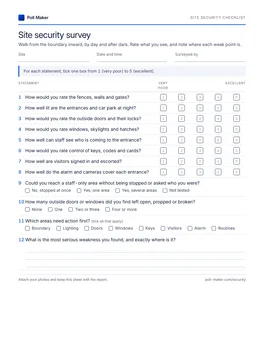
Site security checklist
The walk-through core on page one, with rating boxes and room for the worst weak point. The five optional sets follow, numbered on from 13.
Download PDF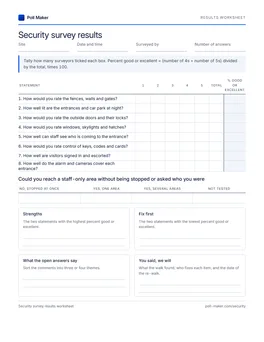
Results worksheet
For several sites: tally the eight area ratings, work out percent good or excellent, and pick the areas to fix across every site.
Download PDFSecurity survey report format
Write the report in the order a busy manager reads it: what matters, what to keep, what to fix and by when. Every section draws on answers you already have.
| Section | What goes in it | From this checklist |
|---|---|---|
| 1. Site and scope | Kind of site, areas covered, past incidents, what needs protecting, and when and by whom it was walked | Questions 13 to 17, plus the date and name at the top of the sheet |
| 2. Summary | The most serious weak points in plain words, and the overall picture in five lines | Questions 11 and 12 |
| 3. What works | Good practice to keep, so it survives the next budget round | Areas rated 4 or 5 |
| 4. Findings by area | Boundary to valuables in walking order, each with its location and photo number | Questions 1 to 10 and the sets you added |
| 5. Actions | One or more options for every weak point, each with a named owner and a deadline | Your priority label (below) |
| 6. Follow-up | The date of the re-walk and what it will check | The same checklist, walked again |
This mirrors the layout CISA uses for its short site assessments: good practices to sustain, then each vulnerability with options to consider, then contacts.2
Labelling what you find
Give every weak point one of three labels. Fix now: an area rated 1 or 2 on the way to people or valuables, or any failed walk-in test. Fix this quarter: other areas rated 1 or 2, and any entrance rated 3. Watch: the remaining 3s, checked again on the re-walk. Three labels keep the action list short enough to finish.
Question sets for the rest of running premises, from crisis planning to warehouse shifts, sit with the business survey questions.
Checklist items that tell you nothing, rewritten
A good checklist item gets the same answer from any two surveyors on the same day. These three do not.
Is the building secure?
Could you reach a staff-only area without being stopped or asked who you were?
"Secure" has no fixed meaning. A walk-in test gives a fact you can fix and test again.
Are the locks, alarm and cameras adequate?
How would you rate the outside doors and their locks?
Do the cameras record a face you could recognise at each entrance?
Three systems in one question. A "no" cannot say which one failed, and "adequate" has no scale.
Do staff follow security procedures?
Could you follow someone through a controlled door without being challenged?
Nobody answers no to the first version. The second checks what actually happens at the door.
Before your first security survey
What is a security survey?
A walk-through inspection of a site that finds its security weak points and recommends how to fix them.1 It covers the boundary, lighting, doors and windows, keys, visitors, alarms and daily routines, and ends with a short written report.
How do you conduct a security survey?
Agree which buildings and areas are in scope, ask the manager about past incidents, then walk from the boundary inward in daylight and again after dark. Rate each area as you pass it, photograph every weak point, and write the report the same day.
How often should a security survey be done?
Walk each site at least once a year, and again after a break-in, building work, a new tenant or a change in opening hours. Book a re-walk 60 days to 6 months after the report to check the fixes.1
Is a security survey the same as a risk assessment?
No. The survey records what protection is in place and how well it works on the day. A risk assessment asks what could happen, how likely it is and how much harm it would do. The survey findings feed straight into it.
Can I use this checklist for a home security survey?
Yes. The boundary, lighting, doors, windows and grounds questions fit a house as written; skip the visitor, card and cash questions. Police home security surveys take the same door-by-door, window-by-window approach.1
Take the checklist on your next walk
Open the walk-through core in the builder, share the link to your phone, and fill it in area by area. Or print the checklist and take a clipboard.