Workplace productivity survey questions that show where employees lose time
The best productivity survey asks employees what helps their work move and what holds it up. The core 12 rates eight everyday drivers, from clear priorities and working tools to focus time and handoffs, names the biggest blockers and puts a number on the hours they cost each week.
- 36questions
- 12in the core
- 5 minto answer the core
- 8drivers rated
By Michael Hodge, BSc Psychology Updated September 2026
Every question, from priorities to handoffs
Your survey already holds the core 12. Tick single questions or add a whole set; the line under each question says what a low or high answer points to.
The core 1212 questions
A self-rating against each person's own best week, eight statements on the things that speed work up or slow it down, a blocker tick list, lost hours and one change. Send it on its own or build on it.
-
Compared with your best weeks, how productive was your last working week?
Far below my bestA bit below my bestAbout usualClose to my bestOne of my bestThe headline number. Measuring against their own best week stops people rating themselves against colleagues, where the average self-rating drifts above the group.3
-
I know which of my tasks matter most right now.
Strongly disagree12345Strongly agree1 = Strongly disagree, 5 = Strongly agreePriority clarity. When this is low, busy people finish the wrong work quickly.
-
The software and equipment I use let me work without delays.
Strongly disagree12345Strongly agree1 = Strongly disagree, 5 = Strongly agreeTools. Often the cheapest fix on the list: a licence, a faster laptop, one less login.
-
I get enough uninterrupted time for work that needs concentration.
Strongly disagree12345Strongly agree1 = Strongly disagree, 5 = Strongly agreeFocus time. Interrupted people keep pace by rushing, so output can look fine while this score falls.2
-
The meetings I go to help me get my work done.
Strongly disagree12345Strongly agree1 = Strongly disagree, 5 = Strongly agreeMeeting value, not meeting count. Read it next to the question on meetings that could have been a message.
-
Approvals and sign-offs rarely hold up my work.
Strongly disagree12345Strongly agree1 = Strongly disagree, 5 = Strongly agreeProcess drag. A low score often traces back to one sign-off step that adds waiting and no checking.
-
I can find the information I need without chasing people for it.
Strongly disagree12345Strongly agree1 = Strongly disagree, 5 = Strongly agreeFindability. Time spent hunting for a file or an answer shows up nowhere else in your numbers.
-
Work I need from other teams arrives when I need it.
Strongly disagree12345Strongly agree1 = Strongly disagree, 5 = Strongly agreeHandoffs. Delays between teams hide inside each team; this is where they show.
-
My training has prepared me for the work I do now.
Strongly disagree12345Strongly agree1 = Strongly disagree, 5 = Strongly agreeSkills. Low here while the tools score well means the fix is training, not new software.
-
What got in the way of your work most in the past two weeks?
InterruptionsMeetingsSlow toolsWaiting on othersShifting prioritiesHunting for informationTick all that applyTurns the ratings into named causes. The option with the most ticks is the first blocker to remove.
-
In a typical week, about how many working hours do you lose to things that get in your way?
NoneUnder 22 to 56 to 10More than 10Puts a size on the problem. The bands convert to hours and money in the worked example further down.
-
What one change would help you get more of your best work done?
Open answerNames the fix people want most. Many answers point at something a manager can change this month.
Focus, interruptions and meetings5 questions
Add these when interruptions or meetings top the blocker list, or when the focus statement scores low.
-
At what time of day do you do your best work?
Early morningMid-morningAfternoonEveningIt variesIf most of the team peaks in the morning, that is where protected focus hours pay off.
-
How often do messages or alerts pull you away from a task?
NeverRarelySometimesOftenAlwaysDigital interruptions. Frequent alerts plus a low focus score point at team habits, not at the person.
-
In my team it is fine to mute messages while I concentrate.
Strongly disagree12345Strongly agree1 = Strongly disagree, 5 = Strongly agreeA team norm, not a personal trick. People only go quiet when they know it is accepted.
-
How many of your meetings last week could have been a message instead?
NoneOne or twoAbout halfMost of themStaff know which meetings add little. The totals give a manager permission to cancel them.
-
Where do you get your most focused work done?
At my usual deskIn a quiet roomAt homeSomewhere elseIf people have to leave their desk to think, the workspace is part of the problem.
Tools and systems5 questions
For teams where slow tools or hunting for information lead the tick list, or before you buy new software.
-
How often does a tool or system problem stop your work?
NeverOnce a month or lessEvery weekMost daysFrequency matters more than severity here. Weekly stoppages add up faster than one bad outage.
-
When a tool breaks, how many hours or days pass before it works again?
Under an hourSame dayNext daySeveral daysSupport speed. A slow fix turns a small fault into lost days.
-
How often do you type the same information into more than one system?
NeverRarelySometimesOftenAlwaysDouble entry is pure lost time, and one of the easier fixes: an import, a link between systems, one shared form.
-
How often do you use AI tools to help with your work?
NeverMonthly or lessWeeklyDailyMany times a dayShows how far AI help has spread, and which teams the others can learn from.
-
Which tool or system slows you down the most, and how?
Open answerNames the tool and the moment it fails, which is what a fix or a purchase decision needs.
Goals, feedback and support4 questions
Add these when priorities score low, or when the open answers talk about unclear expectations.
-
I know how the quality of my work is judged.
Strongly disagree12345Strongly agree1 = Strongly disagree, 5 = Strongly agreeClear standards. Without them people polish work nobody asked for, or stop short of what was needed.
-
When I raise an obstacle, my manager helps remove it.
Strongly disagree12345Strongly agree1 = Strongly disagree, 5 = Strongly agreeA blocker survey only pays off if named blockers get fixed. This checks that they do.
-
I can see how my work adds to what my team is trying to achieve.
Strongly disagree12345Strongly agree1 = Strongly disagree, 5 = Strongly agreeLine of sight. People trade low-value tasks for high-value ones when they can see the difference.
-
How often do you get useful feedback on your work?
WeeklyMonthlyA few times a yearRarely or neverFeedback speed. Long gaps mean mistakes repeat for months before anyone mentions them.
Processes and handoffs3 questions
For operations and project teams where sign-offs or handoffs score low. These find the step to cut.
-
How many people must sign off a routine request in your area?
NoneOneTwoThree or moreNot sureEach extra approver adds a queue. "Not sure" is a finding too: nobody can speed up a process they cannot see.
-
The reports I prepare get read and used.
Strongly disagree12345Strongly agree1 = Strongly disagree, 5 = Strongly agreeUnread reports are work nobody needs. A low score is a list of things to stop.
-
Which step in your work could be dropped with no loss?
Open answerPeople who do the work know the redundant step. Collect them, then test the most common one.
Remote and hybrid work4 questions
For teams that split time between home and an office. Ask about output, not preference.
-
Where do you get more done?
In the officeAt homeAbout the sameDepends on the taskThe last answer invites a follow-up on which tasks suit which place, which is how good hybrid schedules get built.
-
My setup at home lets me work as well as I do in the office.
Strongly disagree12345Strongly agree1 = Strongly disagree, 5 = Strongly agreeGaps at home (a second screen, a chair, a steady connection) are cheap to close and easy to miss.
-
On office days I do work that is worth the trip in.
Strongly disagree12345Strongly agree1 = Strongly disagree, 5 = Strongly agreeIf office days fill with video calls, the commute costs time and buys nothing.
-
On remote days I can get quick answers from the people I need.
Strongly disagree12345Strongly agree1 = Strongly disagree, 5 = Strongly agreeWaiting for replies is the remote form of a slow handoff. Compare it with the handoffs statement in the core.
About you (optional)3 questions
Add these only if you will read results by group, and skip any question that could single someone out in a small team.
-
Which best describes your role?
Individual contributorTeam leadManagerPrefer not to sayLeads and managers often lose more hours to meetings and approvals. This split shows whether they do here.
-
Where do you work most of the time?
On siteHybridRemotePrefer not to sayLets you read the focus and tools answers by work pattern.
-
How long have you worked here?
Under 1 year1 to 3 years4 to 10 yearsOver 10 yearsIf newer staff score lower on finding information and people, the fix is better onboarding.
What your lost hours are worth
Question 11 turns vague complaints into a number a budget holder can act on. Three steps get you there.
From answers to hours
- Give each answer band a midpoint: None = 0, Under 2 = 1, 2 to 5 = 3.5, 6 to 10 = 8, More than 10 = 12.
- Multiply each midpoint by how many people chose it, then add the results. That is the team's lost hours per week.
- Multiply by the weeks your team works in a year, then by an hourly cost. Use your own figure for pay plus overheads.
Example: an accounts team of twenty
This is how their answers to question 11 came back.
| Answer | People | Hours a week |
|---|---|---|
| None | 2 | 0 |
| Under 2 | 5 | 5 |
| 2 to 5 | 8 | 28 |
| 6 to 10 | 4 | 32 |
| More than 10 | 1 | 12 |
| Team total | 20 | 77 |
That is 77 hours a week, close to two full-time jobs. Over 46 working weeks it comes to 3,542 hours, and at an example cost of $40 an hour, $141,680 a year. Now read question 10: if 12 of the 20 ticked interruptions and 9 ticked waiting on others, those two blockers are where the money is. Winning back one hour per person per week returns 920 hours a year.
The real power is in the comparison: run the core again after a fix, and the same sum shows how many hours came back.
Getting the hours back, not just a score
A productivity survey pays off when the answers lead to one change and a second round shows the hours coming back.

Ask what gets in the way, not how hard people work
Questions about effort invite flattering answers. A lab study of interrupted work found people finished interrupted tasks faster, with no drop in quality, by speeding up. The price was more stress, frustration, time pressure and effort, reported after only 20 minutes.2 Output can look healthy while the cost builds, so the core asks about conditions: priorities, tools, focus time, meetings, sign-offs, information, handoffs and training.
Change in employees' productivity ratings, by meeting-free days per week
Change one thing, then run it again
The survey is also how you prove a fix worked. When 76 companies introduced meeting-free days and tracked them with pulse surveys, employees' productivity ratings rose 35% with one meeting-free day a week and 73% with three.1 Pick the lowest statement, change one thing for four to six weeks, then send the core again and compare the same eight statements.

Rate this week against your best week
Asked to compare themselves with colleagues, people on average rate themselves a little higher. A validation study of the WHO work performance questionnaire found exactly that, and the answers about self and about peers ran so close that the authors added a line to tell the two questions apart.3 Question 1 asks each person to compare last week with their own best weeks instead. That gives an honest spread you can track from round to round.
Read the answers by where people work
Place changes output. In a nine-month randomised trial at a 16,000-employee travel company, call centre staff working from home delivered 13% more, partly from more calls per minute in a quieter setting.4 Every organisation has its own pattern, and the remote and hybrid set finds yours: split the focus and tools scores by on site, hybrid and remote before you set any office policy.
Running a team meeting this week? Put question 11 on the screen and poll the team live. The result opens the conversation about blockers better than any slide. There are 40 more meeting poll questions for the same slot, and a guide to sharing a poll over Teams, Slack or email.
Which of the eight drivers is holding the team back
Add up the replies to each of the eight driver statements and type the totals in. Since agreement always means work is flowing, the shortest bars mark where time leaks away.
- 1The panel shows the share of people who agreed or strongly agreed with each statement.
- 2Read the first four together (priorities, tools, focus time, meetings): they cover the working day itself.
- 3Read the last four together (sign-offs, information, handoffs, training): they cover the system around each person.
- 4Match the two shortest bars with the most-ticked blockers, choose one fix with a named owner, and set the date for the next round.
Productivity survey results
Low scores and the first fix to try
Each of the eight statements points at a different kind of fix. Start with the lowest two, and check the blocker tick list to confirm the cause.
| Low score on | Usually means | Try first |
|---|---|---|
| Q2 Priorities | Too many things marked urgent | A ranked top three per person, reviewed weekly |
| Q3 Tools | Slow kit or missing access | Ask the open question in the tools set, then fix the top named tool |
| Q4 Focus time | Constant pings and drop-ins | Two protected focus blocks a week, with messages muted |
| Q5 Meetings | Status meetings with no decision | Swap one recurring meeting for a written update |
| Q6 Sign-offs | Approval queues | Raise the limit that needs sign-off, or cut one approver |
| Q7 Information | Knowledge lives in people's heads | One shared place for the ten most asked-for documents |
| Q8 Handoffs | Other teams do not know your deadlines | Agree a request format and a reply time with the busiest partner team |
| Q9 Training | New tools or tasks without instruction | Short how-to sessions led by the team's strongest user |
Choose one fix per team and allow a month or more before judging it. Productivity problems often start upstream of a single team, in workload or in how news travels, so the employee survey question sets are the next stop when a fix does not move the score.
Warehouse, retail and field teams: use paper
Warehouse, retail and field teams often reply best on paper. Hand the questionnaire out at a team briefing, collect it in a closed box, and add the paper counts to the online ones before you total anything.
Handing out the pulse at a briefing?
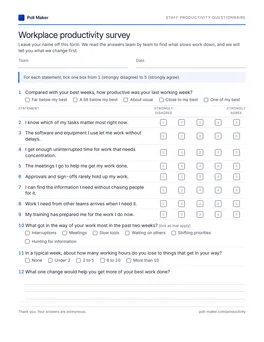
Staff productivity questionnaire
A pencil-and-paper core 12 opens the file, and each optional set follows on its own run of pages.
Download PDF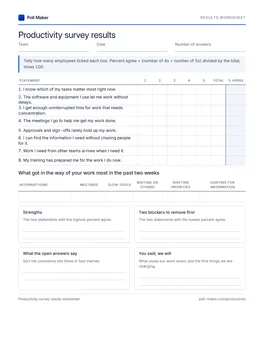
Productivity results worksheet
Count every paper reply, find the share agreeing with each of the eight statements, total the blocker ticks, and note the two blockers to remove first.
Download PDFThe monthly pulse between full rounds
Between full rounds, send these five every month. They track the self-rating, focus time and lost hours, and keep asking for the next fix.
- 01Compared with your best weeks, how productive was your last working week?
- 02I get enough uninterrupted time for work that needs concentration.
- 03What got in the way of your work most in the past two weeks?
- 04In a typical week, about how many working hours do you lose to things that get in your way?
- 05What one change would help you get more of your best work done?
Using this questionnaire in a research project
Studying employee productivity for a thesis or a report? A common design uses a published scale for the outcome and the eight core statements here for the drivers.
| Scale | Covers | Format |
|---|---|---|
| IWPQ (Koopmans) | Task and contextual performance, and counterproductive behaviour | 18 items, past 3 months, scored 0 to 46 |
| WPAI (Reilly) | Work time and output lost to health problems | 6 questions, past 7 days, hours and 0 to 10 ratings |
| WHO-HPQ (Kessler) | Absence, and performance on the days worked | Days missed in 4 weeks, 0 to 10 ratings |
The Individual Work Performance Questionnaire (IWPQ) fits studies where productivity means individual performance. In its Dutch reference sample of 1,424 workers, task performance averaged 2.67 out of 4.5 It is free for scientific use, and commercial use needs a licence from its authors.5 The Work Productivity and Activity Impairment questionnaire (WPAI)7 and the WHO Health and Work Performance Questionnaire (HPQ)8 suit studies about health and work. Use any of them word for word, as published.
Then treat the eight core statements here as predictors: each one is a condition a manager can change. With 5-point answers, report each statement as a mean and as percent agree, and correlate them with the outcome scale. Keep this page's items as they are between rounds so the numbers stay comparable.
Productivity questions that backfire, and better versions
The wording of a productivity question decides whether replies name an obstacle or put someone on the defensive. For other topics, start from the survey question examples, grouped by topic.
How productive are you at work?
Compared with your best weeks, how productive was your last working week?
A general rating invites a flattering answer and gives people nothing to measure against. A fixed week and a personal benchmark give a spread you can track.
Do you have the tools and training you need?
The software and equipment I use let me work without delays.
My training has prepared me for the work I do now.
Two questions in one. A "no" cannot tell you whether to buy software or book training.
How many hours a day are you actually productive?
In a typical week, about how many working hours do you lose to things that get in your way?
Nobody can answer the first honestly, and it sounds like an accusation. Asking about lost time puts the problem on the obstacles.
Would fewer meetings make you more productive?
How many of your meetings last week could have been a message instead?
A leading question collects a yes. The better version counts specific meetings you can act on.
Productivity survey questions, answered
Short answers for managers and HR leads getting ready to send a first round.
What questions should a productivity survey ask?
Ask about the conditions that decide output: clear priorities, tools, focus time, meetings, sign-offs, finding information, handoffs between teams and training. Add a self-rating against each person's best week, a tick list of blockers, an estimate of hours lost, and one open question. Those twelve make up the core set above.
Can a survey measure employee productivity?
A survey measures the conditions and the time lost, which output figures cannot show. Pair it with the numbers you already track, such as tickets closed or orders shipped, and watch whether both move after a fix.
Should a productivity survey be anonymous?
Yes. People name blockers, including managers and slow sign-offs, more readily when replies cannot be linked to a name. Report results by team only when enough people in the team have replied.
How often should we run it?
Send the full core twice a year at most. While a change is being tested, the monthly pulse is enough. Keep the wording identical between rounds so the scores compare.
What scale works best for a productivity questionnaire?
A five-point agree scale, Strongly disagree to Strongly agree, for statements about conditions. Word every statement so agreeing is the good answer; then percent agree reads the same way across all of them.
Find the hours your team is losing
Start with a single team: send the core 12 online, hand paper copies to anyone off the network, and let their answers pick the first blocker to clear.