Free Customer Feedback Form Template
Hear what customers really think in about a minute. One rating, one question that fits what they came to say, and they can stay anonymous unless they want a reply.
- Form Builder
- Customer feedback form
What is a customer feedback form?
A customer feedback form lets customers tell you what they liked, what went wrong, an idea or a question, in their own words. A good one opens with a quick rating, asks what the feedback is about, gives one open box that fits it, and asks for contact details only when they want a reply.
This is the real form. Fill it in to see what people will see. Nothing you type here is sent.
11 questions, about 2 minutes to fill in. Free to publish, with no sign-up and no limit on responses.
Tell us what you think
Good or bad, we read every word. It takes about a minute, and you can stay anonymous.
1. How would you rate your experience overall?
1 to 5
2. What would you like to tell us about?
- Something I liked
- Something that went wrong
- An idea or suggestion
- A question
3. Would you like us to get back to you?
- Yes, please reply
- No, thanks
Send feedback
What questions should a customer feedback form ask?
Ask for an overall rating, what the feedback is about, and one open question that fits it. Ask for a name and email only when the customer would like a reply.
This template asks 11 questions, 8 of them required. 8 appear only when an earlier answer calls for them. Change any of them in the editor.
By Michael Hodge, BSc Psychology. Updated 25 November 2026.
How would you rate your experience overall?
Rating, 5 starsRequired
What would you like to tell us about?
Pick oneSomething I liked, Something that went wrong, An idea or suggestion, A questionRequired
What did you like?
Long answerRequired
Shown only when the answer to "What would you like to tell us about?" is Something I liked
What went wrong?
Long answerRequired
Shown only when the answer to "What would you like to tell us about?" is Something that went wrong
What would make it right for you? (optional)
Long answerOptional
Shown only when the answer to "What would you like to tell us about?" is Something that went wrong
Add a photo or screenshot (optional)
File uploadOptional
Shown only when the answer to "What would you like to tell us about?" is Something that went wrong
What is your idea?
Long answerRequired
Shown only when the answer to "What would you like to tell us about?" is An idea or suggestion
What is your question?
Long answerRequired
Shown only when the answer to "What would you like to tell us about?" is A question
Would you like us to get back to you?
Yes or noOptional
Your name
NameRequired
Shown only when the answer to "Would you like us to get back to you?" is Yes, please reply
Email
EmailRequired
Shown only when the answer to "Would you like us to get back to you?" is Yes, please reply
What makes a good customer feedback form?
A good feedback form takes about a minute, lets customers stay anonymous and asks the follow-up question that fits what they came to say.
Starts with a tap.
A star rating first, because surveys that open with a quick choice are finished more often than ones that open with a text box.
Asks the right follow-up.
Praise, a problem, an idea or a question: each gets its own prompt, so people write useful answers instead of staring at "Any comments?".
One text box, not three.
Every extra open question loses respondents, so each customer sees exactly one required box.
Anonymous unless they ask.
Name and email only appear when the customer wants a reply, so you get honest feedback.
Problems come with proof.
Customers reporting something that went wrong can add a photo or screenshot.
How does this customer feedback form compare with Tally, Jotform and Fillout?
It opens with a quick rating and asks for contact details only when the customer wants a reply. Tally, Jotform and Fillout all require an email, and Tally can be finished without writing any feedback at all.
| Poll MakerThis template | TallyCustomer Feedback Form Template | JotformFeedback Form | FilloutCustomer Review Form Template | |
|---|---|---|---|---|
| Questions | 114 on the shortest path; the rest appear by topic | 7All shown | 4All shown | 13All shown |
| Required answers | 3Name and email only for a reply | 3Email, a source question and a rating grid | 3Name and email among them | 11Terms and a marketing-use question among them |
| Time to fill in | About 1 minAbout 3 min for a complaint with a reply | About 34 sWith no feedback written; about 3.3 min with it | About 79 s | About 2.5 minRequired answers only |
| Opens with | A 5-star ratingPoor to Excellent | An email, then a source questionThe rating grid is on page 2 | A feedback typeComments, suggestions or questions | Three 1 to 10 scales |
| Contact details | Only if you want a replyAnonymous by default | Email required first | Name and email required | Name and email requiredAnd a phone number |
Free form builder facts
Every Poll Maker form is free to build, publish and fill in, with no account for you or the people who answer. Poll Maker has been online since 2003. Checked 25 November 2026.
- No sign-up, even to publish
- Unlimited responses
- No ads on your form
- No account to respond
- 32 block types
- File uploads and signatures
- Logic rules and endings
- Themes, light or dark
- Share by link or QR code
- Embed on your site
- Results with charts
- CSV and Excel downloads
What does research say about customer feedback forms?
Short forms that open with a quick closed question are finished more often, and most people would rather not give a phone number.
Surveys that open with a multiple-choice question are finished 89% of the time, against 83% for those that open with an open question.
Measured studySurveyMonkey
Each extra question raises drop-off most sharply up to the 15th question.
Measured studySurveyMonkey, 100,000 surveys
14% of people refuse to give a phone number, and 39% of sites require one with no explanation.
Measured studyBaymard Institute
Across more than 40,000 landing pages, multi-line text boxes and several dropdowns carried the biggest conversion penalty of any field type.
Measured studyHubSpot
Open questions find what you did not expect; a survey of closed questions only gives back what you expected.
Expert opinionNielsen Norman Group
Questions for where the feedback comes from
Add any of these in the editor when your setting calls for them. Each one is written to be answered in seconds.
Customer service and support
Was your issue resolved?
Yes / Partly / No
The first question to put after a support conversation. A "No" is a customer to call back today.
How would you rate the person who helped you?
Rating, 1 to 5
Separates the person from the policy: people often rate the helper well and the outcome badly, and both are worth knowing.
How long did it take to get help?
Within an hour / The same day / More than a day / I am still waiting
Response time as the customer experienced it, which is rarely the number in the ticketing system.
Phone number, if you would prefer a call
Phone number
Pairs with the reply question in the full form. Some problems are faster to sort out in a two-minute call than in six emails.
Products and features
Which feature do you use most?
Short answer
Tells you what people actually rely on, which is often not what the roadmap assumes.
What did you expect to find that was missing?
Paragraph
Expectation gaps are where product ideas come from, phrased in the customer's own words.
How often do you use it?
Every day / Every week / Every month / Rarely
Weights the feedback: a request from a daily user carries more than one from someone who logs in twice a year.
Websites and apps
Did you find what you were looking for?
Yes / Partly / No
The simplest measure of whether a website works. Pair it with the next question to learn what people were after.
What were you trying to do today?
Short answer
Visitors describe their task in words your navigation might not use. Those words belong in your menus and headings.
Which device are you using?
Phone / Tablet / Computer
A complaint that only comes from phones is a layout bug, not a content problem.
Shops, cafes and front desks
Which location did you visit?
Short answer
For more than one branch, so praise and problems reach the right manager.
When did you visit?
Date
Lets a manager match feedback to the rota and the day's circumstances, from a delivery that came late to a new starter on shift.
How friendly and helpful were our staff?
Rating, 1 to 5
In person, the staff are the experience. A separate score gives managers something specific to recognise or coach.
A feedback form worth filling in
People fill in feedback forms when they believe someone will read them. The form and what you do with it both send that message.
Measure satisfaction and effort
Satisfaction tells you how people feel; effort tells you what to fix. Dixon, Freeman and Toman found in their customer-service research that effort predicted loyalty better than satisfaction measures or the Net Promoter Score.1 Two quick ratings at the top of the form give you both.
Sort feedback as it arrives
A general form collects everything: a bug, a billing mistake, a compliment for a named employee. The topic question sends each message to the right pile before anyone reads it, and the piles show you where most of the feedback comes from.
Reply, and show what changed
Answer every message that left an email address, even with two lines. Then tell customers what you changed because of their feedback. A form that visibly leads somewhere gets used again.
At a till, a help desk or the end of a chat, one tap can be enough. A single-question poll takes a second to answer and still gives you a daily reading.
Comment cards for the counter
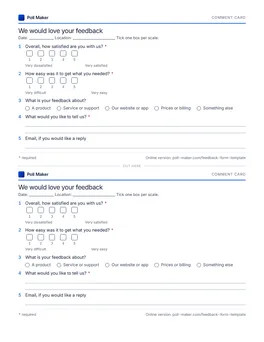
Not everyone wants to scan a code. Printed comment cards let people leave feedback on paper.
Printable comment cards, two per page
Five feedback questions on a half-page card, twice on one Letter sheet. Leave a stack and a pen by the till, with a box for finished cards.
Where to put your feedback form
The same form can sit in several places. Start with the one closest to the moment people form an opinion.
Website footer or contact page
Embed the form or link to it
Receipt or order confirmation email
A one-line link under the order details
Support replies
A link in the signature, or sent when a ticket closes
Counter, table or front desk
A printed QR code, or the comment cards
Quarterly check-in with clients
Emailed link
Making it an anonymous feedback form
For staff suggestions, a school or a community group, people say more when they know they cannot be identified.
What to watch
In a small team, answers can identify people even without a name. A department plus a job title can point to one person. Leave those questions out, or use broad groups such as "Office" and "Field".
What to tell people
Say it in the intro: "This form does not ask for your name or email." Then keep the promise. Do not play detective over the author of a comment, even when you think you know.
Feedback form questions
How long should a customer feedback form be?
As short as you can make it. Large survey studies show completion drops with every extra question, most of all with open text questions. This template takes about a minute.
Should customer feedback be anonymous?
Letting people stay anonymous usually gets more honest answers. This form only asks for a name and email when the customer says they would like a reply.
What is the difference between a feedback form and a satisfaction survey?
A satisfaction survey measures a score you track over time. A feedback form collects what customers want to tell you: praise, problems, ideas and questions. Use our customer satisfaction survey template if you need the score.
When should I send a customer feedback form?
Soon after the experience, while it is fresh: after a purchase, a visit or a support conversation. You can also keep the link on your website so customers can tell you anything at any time.
Is this customer feedback form template free?
Yes. The customer feedback form template and the form builder are free: build the form, publish it and collect responses with no account, no limit on responses and no ads on your form. Downloading every response as a CSV or Excel file is free too.
How do I share the feedback form?
Publish it, then share the link by email or text, print it as a QR code at your counter, or embed it on your website from the Share tab.
Where should I put a feedback form?
Wherever the experience ends: the receipt email, your website footer, support replies and a QR code at the counter. The table above shows which version suits each place.
Can I print a feedback form?
Yes. The comment cards above print two to a page. Cut them in half and leave a pile by the till.
- Dixon, M., Freeman, K. and Toman, N. (July to August 2010). Stop trying to delight your customers. Harvard Business Review. Introduces the Customer Effort Score as a better predictor of loyalty than satisfaction or the Net Promoter Score. hbr.org/2010/07/stop-trying-to-delight-your-customers
- Bain and Company. Measuring your Net Promoter Score. www.netpromotersystem.com/about/measuring-your-net-promoter-score/
- Reja, U., Lozar Manfreda, K., Hlebec, V. and Vehovar, V. (2003). Open-ended vs. close-ended questions in web questionnaires. Developments in Applied Statistics, Metodoloski zvezki 19. mrvar.fdv.uni-lj.si/pub/mz/mz19/reja.pdf
More form templates
To track a satisfaction score over time, use the CSAT survey template; to hear which features customers want next, the feature request template; and to give visitors one simple way to get in touch, the website contact form. Each one opens in the free form builder, ready to change.
Customer satisfaction survey
7 questionsabout 1 min
Use templateFeature request form
8 questionsabout 2 min
Use templateContact form
6 questionsabout 1 min
Use template
After an event: event feedback form
For a website or app: website feedback questions
More ideas by topic: feedback survey questions
Want to start from scratch? Open the free form builder
Make this form yours in a minute
Change any question, add your own words and colours, then share one link. Free, with no sign-up to publish and no limit on responses.